
How GitHub Uses CodeQL to Secure Code at Scale
GitHub uses CodeQL to scan code as data, detect vulnerabilities, and secure thousands of repos automatically at scale.
When you think about GitHub, you probably think about code hosting, pull requests, and collaboration. But behind the scenes, GitHub is also responsible for securing thousands of repositories and millions of lines of code. And doing that manually? Not even remotely possible. The answer isn’t just “security engineers reviewing code.” That would never scale. Instead, GitHub relies heavily on something much more powerful, CodeQL. Let’s discover what it is and how GitHub uses it to secure the code at this huge scale.
What is CodeQL?
CodeQL is a static analysis tool. But unlike traditional tools that scan code using simple patterns or keyword matching, it treats code like structured data. This means you can actually query your codebase the same way you would query a database.
You can think of your codebase as structured data. So instead of asking: “Where is this string used?” With CodeQL, you can ask questions like:
“Where is user input flowing into a database query?”
“Which APIs are being used without proper validation?”
“Where are we missing authorization checks?”
That shift from text search to semantic understanding is what makes CodeQL so powerful.
How GitHub Uses CodeQL Internally
At GitHub CodeQL isn’t optional, it’s part of their default development workflow. For most repositories, CodeQL runs automatically on every pull request. So whenever a developer pushes code or opens a PR, CodeQL scans it and flags potential issues before the code is merged.
This ensures that:
vulnerabilities are caught early
developers get instant feedback
security becomes part of development, not an afterthought
For the majority of GitHub’s repositories, this default setup is enough to maintain a strong security baseline. However, not all codebases are the same. Some systems like GitHub’s large Ruby monolith have unique patterns, internal APIs and specific security risks. To handle this, GitHub builds custom query packs.
What is a Query Pack?
A query pack is simply a collection of CodeQL queries, designed for a specific codebase or use case.
These queries help detect issues like GitHub-specific risky APIs, Missing authorization checks, Unsafe framework usage
Why Not Just Write Queries Directly?
Initially, GitHub stored queries directly inside repositories. But this caused problems:
Every update required a deployment
Queries weren’t precompiled thus slower CI
Version mismatches caused confusing failures
The Better Approach
GitHub moved query packs to a central registry (GitHub Container Registry). This allowed them to version queries properly, deploy updates faster and avoid CI instability.
They also follow a smart strategy:
During development: use latest dependencies
During release: lock versions for stability
This balance ensures both innovation and reliability.
Treating Security Queries Like Production Code
One of the most interesting things GitHub does is how seriously they treat their queries. They don’t just write them and hope they work. Instead, they write unit tests for queries, test them on sample code and run them through CI pipelines. This ensures fewer false positives, better developer trust and stable security checks.
What Do These Queries Actually Detect?
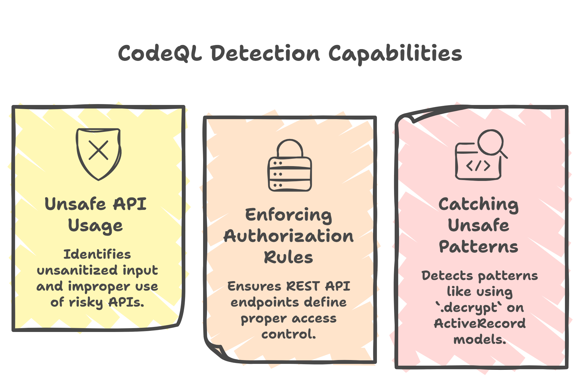
The real value of CodeQL comes from what it can detect. GitHub uses custom queries to enforce important security rules.

1. Detecting Unsafe API Usage
Some internal APIs become dangerous when they handle unsanitized user input.
CodeQL identifies:
where input is not sanitized
where risky APIs are used improperly
2. Enforcing Authorization Rules
GitHub ensures that every REST API endpoint defines proper access control. If a developer creates an endpoint but forgets to include the required control_access method, CodeQL flags it immediately.
This prevents:
unauthorized access
security gaps in APIs
3. Catching Unsafe Patterns
Example: Using .decrypt on ActiveRecord models.
In simple terms, this method takes data that was stored in an encrypted form (for safety) and converts it back into plain text. Now here’s the problem. When you use .decrypt, it doesn’t just read the data, it can permanently store it in an unencrypted form. That means something that was supposed to stay protected (like passwords, tokens, or personal data) could accidentally become visible in plain text.
This can:
expose sensitive data
break encryption guarantees
CodeQL automatically scans the code and detects when .decrypt is used.
Instead of waiting for a security engineer to find this manually, it flags it during the pull request and alerts the developer immediately. So the developer can avoid using it or replace it with a safer approach.
Not All Alerts Are Blockers
GitHub uses two types of alerts:
Blocking alerts: Alerts that must be fixed before merge
Advisory alerts: These are guidance for developers
This balance is important. If it’s too strict, it slows down development. If it’s too loose, it risks security. GitHub finds the right middle ground.
Variant Analysis
One of the most powerful techniques GitHub uses is variant analysis.
What is Variant Analysis?
When a vulnerability is found in one place, GitHub asks: “Where else could this same issue exist?” Instead of fixing just one instance, they search for similar patterns across all repositories.
Example: IDOR Vulnerability
GitHub once investigated a case where user input was used to fetch a database object and then the same input was reused later incorrectly leading to unauthorized access Insecure Direct Object Reference (IDOR).
How They Solved It
They wrote a custom CodeQL query to track user input, follow its flow through the code and detect risky patterns. Even if results weren’t perfect, it helped narrow down the search significantly.
Scaling This Across Repositories: MRVA
So far, we’ve seen how CodeQL can detect issues in a single repository. But here’s the real problem GitHub faces: What if the same vulnerability exists in hundreds of repositories? Fixing one repo is easy but finding and fixing it everywhere? That’s the hard part.
This is where Multi-Repository Variant Analysis (MRVA) comes in.
Instead of fixing a vulnerability in just one place, GitHub writes a CodeQL query for that pattern and runs it across multiple repositories at once. This helps them quickly identify all similar cases across the system.
How It Works
Let’s say a vulnerability is found where user input is passed unsafely into a database query. Instead of manually searching, GitHub writes a CodeQL query that:
tracks user input
follows how it flows through the code
detects where it is used dangerously
This query is then executed across many repositories.
Why not use Simple Search?
Simple code search works on text and doesn’t understand logic or data flow at all. On the other hand CodeQL understands how data moves and detects real patterns, not just keywords.
Security Built into CI
One of the biggest reasons this works is integration with CI. CodeQL runs automatically on every pull request without developer intervention.
This means:
issues are caught early
developers fix problems immediately
no separate security audit needed
Takeaways
There are some strong system design takeaways here.
1. Automation is Non-Negotiable: At scale, manual security simply doesn’t work. You need automated detection systems
2. Customize for Your System: Generic tools are not enough. GitHub builds custom queries for its own needs
3. Shift Security Left: Security should happen during development and not after deployment.
4. Detect Patterns, Not Just Bugs: Fixing one issue is not enough. The better approach is to find all similar issues.
5. Build Trust in Tooling: Testing queries and reducing false positives ensures developers actually trust the system
Official blog from GitHub: How GitHub uses CodeQL to secure GitHub
By now, you must have had a clear idea of, How GitHub Uses CodeQL to Secure Code at Scale? In a nutshell, GitHub uses CodeQL to automatically scan code for security issues by treating code like data and running queries on it. With custom queries and variant analysis, it detects and prevents vulnerabilities at scale across thousands of repositories.
Congratulations! You've just advanced another step in your tech journey. Keep progressing!