
How Slack makes its Mobile App Feel Seamless (Even on Bad Internet)
Slack optimizes mobile performance using prioritized APIs, caching + versioning, offline sync, and scalable architecture for reliable user experience.

How to ship better frontend experiences faster
The Datadog Frontend Developer Kit brings together essential resources to help you monitor performance, fix errors faster, and improve real user experience.
Inside the kit, you’ll find:
Best practices guide on strengthening your frontend monitoring and testing strategies
Step-by-step brief on catching and resolving frontend issues proactively
Technical talk discussing how to better monitor and optimize frontend apps
If you’re building modern web apps, this kit helps you see what users see and fix what matters.
Link to the Kit: Frontend Developer Kit
When we use apps like Slack on our phones, we expect things to just work seamlessly. Like messages should load instantly, channels should update in real time and everything should feel smooth even when we’re switching networks, riding a metro, or dealing with poor connectivity. But behind the scenes, making this happen is far from simple. Let’s discover how Slack’s engineering team solves some very real mobile challenges without overcomplicating things and how they keep the app fast, reliable, and scalable in this blog today.
The Core Problem: Mobile is Unpredictable
On desktop, things are relatively easy. You’re usually on stable Wi-Fi. The app stays open for long sessions. Data can be fetched continuously without interruptions. But mobile is a completely different story.
Users:
Move between networks (Wi-Fi → cellular → no signal)
Open the app for short bursts
Expect instant responses despite unstable connections
So the biggest challenge becomes: How do you fetch the most important data quickly even when the network is unreliable?

Smart Data Fetching
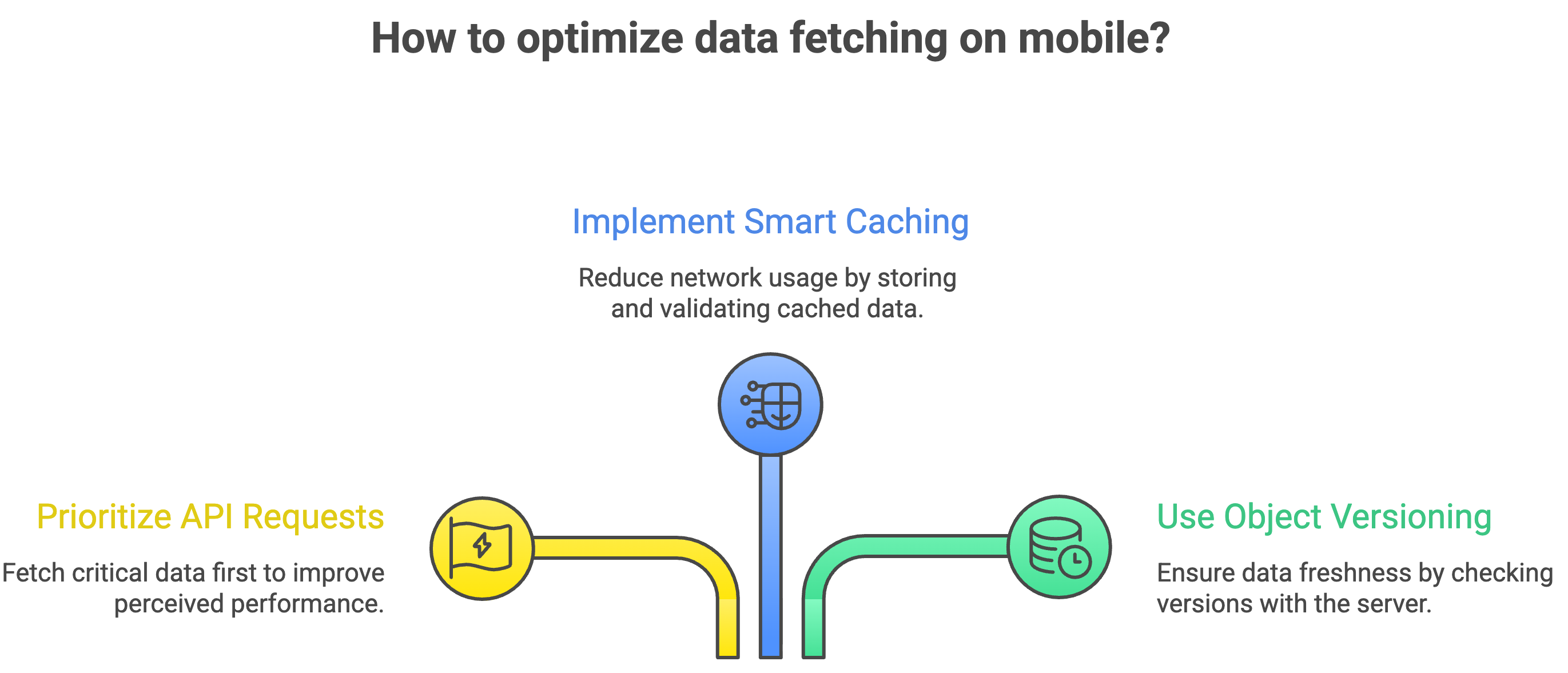
Slack tackles this by prioritizing API requests. Instead of treating all data equally, the system decides:
What is critical right now?
What can wait?
For example:
Messages in the current channel are considered as high priority
Background updates are considered as lower priority
So when the app gets even a small window of connectivity, it fetches the most important data first. This ensures that users can read messages and interact with conversations even if everything else hasn’t loaded yet. This one decision massively improves perceived performance.
Reducing Network Calls with Smarter Caching
Another key idea is avoiding unnecessary data fetching. Slack uses caching, but not in a naive way. Instead of blindly re-fetching data every time:
The app stores previously fetched data
It checks whether that data is still valid before making new requests
Thus it reduces Network usage, Load time and Dependency on connectivity. But this raises an important question: How does the app know if cached data is still up to date?
Versioning (This is the Secret Behind Fresh Data)
Slack solves this using something called object versioning. Here’s the idea in simple terms: Every piece of data (like a message or channel) has a version.
When the app has cached data:
It asks the server: “Is my version still the latest?”
If yes → no need to download again
If no → fetch the updated version
This avoids Re-downloading identical data, Wasting bandwidth and Slowing down the app. The implementation isn’t trivial though.
Versioning logic:
Differs based on the type of object
Requires coordination between client and server
Needs accurate version calculation
But once done right, it leads to significant reduction in data usage
Fixing the Bigger Problem first i.e. Technical Debt
Over time, Slack’s mobile codebase started facing issues:
Inconsistent feature development
Slower delivery
Difficulty meeting product deadlines
Growing technical debt
This is something almost every large system faces eventually. So instead of patching things slowly, the team took a bold step: They revamped the mobile architecture.
This included:
Major codebase changes
Cleaning up legacy code
Introducing a new feature architecture (especially on iOS)
This wasn’t easy at all, but this resulted into faster development, better consistency across features and improved ability to scale.
This shows us that sometimes, the only way forward is to rebuild the foundation properly.
Risk Management (Thinking what if Things Break?)
Making changes to a mobile app especially something like networking is risky. One wrong change can break critical functionality, impact millions of users and cause cascading failures. So Slack uses feature flags (change toggling).
What are feature flags?
They allow engineers to:
Turn features ON/OFF remotely
Roll out changes gradually
Quickly roll back if something goes wrong
So instead of pushing risky changes blindly, they test in controlled environments, monitor real-world impact and disable instantly if needed. Still, no system is perfect.
So they also:
Push hotfixes when urgent issues arise
Perform deep analysis after failures
Improve testing processes
This constant feedback loop helps them improve over time.
Scaling Challenges (It’s Not Just Users, It’s Complexity)
Slack doesn’t just deal with millions of users. It also deals with:
Workspaces having 80,000 custom emojis
Users in 20,000 channels
Large teams constantly modifying the app
On top of that, their mobile engineering team itself has grown to 120+ engineers. This introduces a different kind of scaling problem: How do you manage a massive codebase with so many developers working on it?
The answer is to keep the architecture clean, build reusable components and continuously refactor because scaling isn’t just about handling traffic, it’s also about handling people and code complexity.
Building for Offline Mode
One of the most interesting problems Slack solved is: How do you make features work even without internet?
A feature team wanted users to:
Perform actions offline
Save changes
Sync them later
Instead of solving this problem again and again for every feature, the infrastructure team built a shared component for offline data handling.
What does this component do?
It stores user actions when offline, tracks what needs to be synced and applies changes once connectivity returns.
So, now any feature can:
Plug into this system
Define what actions to store
Let the system handle syncing
This leads to much better user experience, less duplicated work and cleaner code across teams.
Why This Matters
If you step back, you’ll notice a pattern in all these decisions:
Prioritize what matters: Not all data is equal so fetch the important stuff first.
Avoid unnecessary work: Don’t refetch what hasn’t changed.
Build reusable systems: Solve problems once, not repeatedly.
Expect failures: And design systems that can recover quickly.
Continuously improve: Refactor, learn, and adapt.
What makes Slack’s mobile app feel smooth isn’t just good UI. It’s the result of:
Smart networking strategies
Efficient data handling
Thoughtful architecture decisions
Continuous iteration
The real takeaway here is simple, Building great mobile apps isn’t about handling the best-case scenario, it’s about designing for the worst conditions and still delivering a great experience. And Slack does exactly that.
Official blog from Slack: Slack Behind the Scenes: Overcoming Key Challenges to Craft a Seamless Mobile App
By now, you must have had a clear idea of, How Slack makes its Mobile App Feel Seamless (Even on Bad Internet)? In a nutshell, Slack makes its mobile app fast and reliable by prioritizing critical data, using smart caching with versioning, and handling offline + poor network scenarios efficiently. It also improves scalability and development speed through better architecture, reusable components, and safe feature rollouts.
Congratulations! You've just advanced another step in your tech journey. Keep progressing!