
How Snowflake Improved Performance by 27% (Without Users Noticing)
Snowflake boosts performance by 27% via backend optimizations in ingestion, planning, and execution thus faster queries and lower cost automatically
Imagine using a product that keeps getting faster every week without upgrades, without migrations and without touching a single setting. That’s exactly what Snowflake has been doing. Over time, they’ve improved performance by 27%, tracked using something called the Snowflake Performance Index (SPI). But this isn’t just a random number, it represents real improvements experienced by real users on real workloads. Let’s discover what exacly happened and how Snowflake achieved this in this blog today.
What is Snowflake?
Snowflake is a cloud data platform.
In simple words, It helps companies store, process, and analyze massive amounts of data.
You can:
Run SQL queries
Build dashboards
Process analytics workloads
Ingest data from multiple sources
All without worrying about infrastructure.
What is the Snowflake Performance Index (SPI)?
The Snowflake Performance Index (SPI) is a metric Snowflake introduced to measure: How much faster customer workloads are getting over time.
This is important because most companies:
Use synthetic benchmarks (fake tests)
Show ideal scenarios
Snowflake does something different. It measures performance on real production workloads which means, totally real queries, real data and real usage patterns.
The Numbers
27% improvement since Aug 2022
12% improvement in the last 12 months
This is not theoretical, this is what customers actually experience.
How Snowflake Improves Performance
Here’s the interesting part. Snowflake doesn’t rely on:
Manual tuning
Configuration changes
Version upgrades
Instead, they continuously improve the core engine and release updates every week.
This works because Snowflake uses a fully managed cloud architecture and a consumption-based pricing model.
So when performance improves:
Queries run faster
Compute usage drops
Costs reduce automatically
Key Areas Where Snowflake Improved Performance
1. Faster Data Ingestion
Everything starts with getting data into Snowflake. If ingestion itself is slow, everything downstream gets delayed.
Snowflake improved how it reads and processes semi-structured data formats like JSON and Parquet. These formats are widely used but can be expensive to parse, especially when dealing with case-insensitive data. By optimizing this layer, Snowflake was able to improve ingestion performance by up to 25%.
By doing this, data becomes available faster for querying. If you’re running pipelines or near real-time analytics, this directly reduces the overall latency of your system.
2. Faster Communication Between Nodes
Snowflake doesn’t run your query on a single machine. It spreads the work across multiple machines (nodes). These machines constantly send data to each other while processing a query.
Earlier, this communication could become a bottleneck.
So Snowflake improved:
how data is transferred between nodes
how data is compressed before sending
optimized aggregation placement, essentially deciding where certain computations (like SUM or COUNT) should happen so that less data needs to move across the network.
You can think of it like this, instead of moving a lot of raw data across machines, Snowflake now tries to process data earlier and send less of it around.
This reduces waiting time and makes queries faster.
3. Smarter Query Optimization
One of the biggest wins comes from making the query optimizer smarter.
Whenever you run a SQL query, the system doesn’t just execute it as-is. It first decides the best possible way to run it, which tables to scan first, how to perform joins, where to filter data, and so on.
Snowflake improved this decision-making process in a few key ways. Now it:
better understands how much data each filter will remove
chooses a smarter order to join tables
decides when to move data vs when to process locally
For example, if one table is huge and the other is small, it can decide the most efficient way to join them instead of blindly following the query order.
You don’t change your query, Snowflake just runs it in a better way.
4. Improvements in Query Execution
Once the plan is ready, the query actually runs. Snowflake improved how this execution happens. Instead of processing everything at the end, it now tries to reduce data as early as possible.
For example:
applying filters early
doing aggregations earlier
reducing intermediate data
If you shrink the data early, everything that follows becomes faster. It’s like cleaning unnecessary items from a list before processing it, less work overall.
5. Better Memory Management
Memory is one of the most critical resources during query execution. If a query runs out of memory, it spills data to disk, which is significantly slower.
Snowflake improved how it manages memory, especially for complex queries involving multiple joins. Now it:
avoids unnecessary memory usage
reduces chances of spilling to disk
handles large joins more efficiently
It results in fewer spills to disk and more work happening in-memory, which leads to faster and more stable query performance.
6. Smarter Query Pruning with Top-K Optimization
One of the more interesting improvements is something called Top-K pruning.
Consider this query:
SELECT * FROM products
ORDER BY price DESC
LIMIT 10;
You only need the top 10 results.
Earlier, the system might scan a large portion of the data before deciding the top 10.
Now Snowflake does something smarter: As soon as it knows the remaining data can’t affect the result, it stops scanning further
So instead of doing full work, it does only the required work and this directly improves performance (around 12.5% for such queries).
7. Query Acceleration Service Enhancements
Snowflake also improved its Query Acceleration Service (QAS), which is designed to speed up heavy queries by offloading parts of the work to additional compute resources.
Now, more types of queries can use this service (even INSERT queries). So more queries benefit from acceleration automatically without any manual setup.
8. Better Clustering and Data Pruning
Finally, Snowflake improved how data is organized internally through clustering.
Better clustering means related data is stored closer together, which allows the system to skip irrelevant data during query execution, a process known as pruning.
When pruning is more effective, queries scan less data. Less scanning directly translates to faster queries and lower compute costs. Snowflake estimates this can reduce costs by around 10% for certain workloads.
Putting it All Together
If you look at everything together, Snowflake improved performance by focusing on a few simple ideas:
Get data in faster
Move less data between machines
Make smarter decisions before execution
Reduce data as early as possible
Avoid doing unnecessary work
Use memory and compute more efficiently
None of these changes require you to rewrite queries, tune configs and upgrade anything
And that’s the most important part. Snowflake improved performance not by adding complexity for users, but by making the system smarter internally.
Takeaways
This isn’t just about Snowflake getting faster, it’s about how good systems are designed.

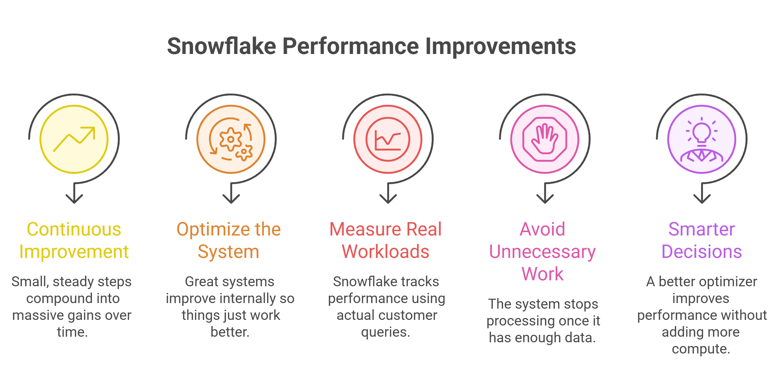
First, continuous improvement beats big releases. Instead of shipping rare, heavy updates, Snowflake improves performance in small, steady steps. Over time, these changes compound into massive gains.
Second, optimize the system, not the user. Great systems don’t ask users to tune queries or configs. They improve internally so things just work better without extra effort.
Third, measure real workloads, not benchmarks. Snowflake tracks performance using actual customer queries, not synthetic tests. That’s what makes the improvements meaningful in real-world scenarios.
Another key idea is avoiding unnecessary work. With optimizations like Top-K pruning, the system stops processing once it has enough data. This simple principle can drastically improve performance.
Finally, smarter decisions beat more resources. A better optimizer, choosing the right join order or execution plan can improve performance without adding more compute.
Official blog from Snowflake: Snowflake Improves Performance by 27%, According to the Snowflake Performance Index
By now, you must have had a clear idea of, How Snowflake Improved Performance by 27%? In a nutshell, Snowflake improved performance by 27% through continuous backend optimizations in ingestion, query planning, and execution without requiring any user changes. By making the system smarter (not heavier), it delivers faster queries and lower costs automatically over time.
Congratulations! You've just advanced another step in your tech journey. Keep progressing!