
Cells in a Range on an Excel Sheet
EasyPrompt
A cell (r, c) of an excel sheet is represented as a string "<col><row>" where:
<col>denotes the column numbercof the cell. It is represented by alphabetical letters.- For example, the
1stcolumn is denoted by'A', the2ndby'B', the3rdby'C', and so on.
- For example, the
<row>is the row numberrof the cell. Therthrow is represented by the integerr.
You are given a string s in the format "<col1><row1>:<col2><row2>", where <col1> represents the column c1, <row1> represents the row r1, <col2> represents the column c2, and <row2> represents the row r2, such that r1 <= r2 and c1 <= c2.
Return the list of cells (x, y) such that r1 <= x <= r2 and c1 <= y <= c2. The cells should be represented as strings in the format mentioned above and be sorted in non-decreasing order first by columns and then by rows.
Example 1:
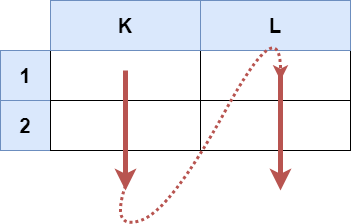
Input: s = "K1:L2"
Output: ["K1","K2","L1","L2"]
Explanation:
The above diagram shows the cells which should be present in the list.
The red arrows denote the order in which the cells should be presented.
Example 2:

Input: s = "A1:F1"
Output: ["A1","B1","C1","D1","E1","F1"]
Explanation:
The above diagram shows the cells which should be present in the list.
The red arrow denotes the order in which the cells should be presented.
Constraints:
s.length == 5'A' <= s[0] <= s[3] <= 'Z''1' <= s[1] <= s[4] <= '9'sconsists of uppercase English letters, digits and':'.
Approaches
2 approaches with complexity analysis and trade-offs.
This approach involves parsing the input string s to extract the start and end coordinates. We identify the column characters and row characters by their fixed positions in the string. The row characters are then converted to their integer equivalents. The core of the solution is a pair of nested loops. The outer loop iterates through the column characters from the start column to the end column. The inner loop iterates through the row numbers (as integers) from the start row to the end row. Inside the inner loop, we construct the cell identifier string by combining the current column character and row number, and add it to our result list.
Algorithm
- Initialize an empty
ArrayListof strings, let's call itresult. - Get the starting column character
c1froms.charAt(0). - Get the ending column character
c2froms.charAt(3). - Get the starting row character from
s.charAt(1)and convert it to an integerr1. - Get the ending row character from
s.charAt(4)and convert it to an integerr2. - Start an outer
forloop that iterates with acharvariablecfromc1toc2. - Inside the outer loop, start an inner
forloop that iterates with anintvariablerfromr1tor2. - In the body of the inner loop, concatenate
candrto form the cell string. - Add this new string to the
resultlist. - After both loops have completed, return the
resultlist.
Walkthrough
This approach works by first parsing the necessary boundary information from the input string s. Given the fixed format C1R1:C2R2, we can reliably extract the start column c1 at index 0, start row r1 at index 1, end column c2 at index 3, and end row r2 at index 4.
While the columns c1 and c2 are characters and can be used directly in a loop, the row boundaries r1 and r2 are digit characters. This approach converts them into integers before looping. For example, s.charAt(1) - '0' converts the character '1' to the integer 1.
After parsing, two nested loops are used to generate the cell names. The outer loop iterates through each column character from c1 to c2. For each column, the inner loop iterates through each row number from r1 to r2. Inside the inner loop, the cell name is constructed by concatenating the current column character and row integer. This new string is then added to a list. The final list, containing all cell names in the desired order, is returned.
import java.util.ArrayList;import java.util.List; class Solution { public List<String> cellsInRange(String s) { List<String> result = new ArrayList<>(); char c1 = s.charAt(0); char c2 = s.charAt(3); // Convert row characters to integers int r1 = s.charAt(1) - '0'; int r2 = s.charAt(4) - '0'; for (char c = c1; c <= c2; c++) { for (int r = r1; r <= r2; r++) { result.add("" + c + r); } } return result; }}Complexity
Time
O(C * R), where C is the number of columns and R is the number of rows in the given range. We must visit each cell in the range once to generate its string representation. The total number of cells is C * R.
Space
O(C * R) to store the output list. The space required is proportional to the number of cells in the range, as each cell string is stored in the result list. An additional O(1) space is used for loop variables.
Trade-offs
Pros
The logic is straightforward and easy to follow, directly translating the problem's requirements into code.
It correctly generates the cells in the specified order (column-first, then row-first).
Cons
It performs an unnecessary conversion of row characters to integers. While this is a minor operation, a more direct approach can avoid it.
This is a more streamlined and efficient approach that takes full advantage of the properties of character encoding. Since both the column letters ('A'-'Z') and row digits ('1'-'9') are contiguous in the ASCII table, we can iterate through them directly as characters. This method extracts the start and end characters for both columns and rows and uses two nested char loops to generate all combinations. This avoids the intermediate step of converting row characters to integers, making the code slightly cleaner and more performant.
Algorithm
- Initialize an empty
ArrayListof strings,result. - Extract the start column character
c1froms.charAt(0). - Extract the end column character
c2froms.charAt(3). - Extract the start row character
r1froms.charAt(1). - Extract the end row character
r2froms.charAt(4). - Start an outer
forloop that iterates with acharvariablecfromc1toc2. - Inside, start an inner
forloop that iterates with acharvariablerfromr1tor2. - In the inner loop, construct the cell string by appending the character
cand the characterr. - Add the resulting string to the
resultlist. - After the loops complete, return the
resultlist.
Walkthrough
This approach is a refinement of the previous one and is considered more direct and efficient. It recognizes that since the row indicators ('1' through '9') are also characters with sequential ASCII values, there is no need to convert them to integers. We can iterate through the rows using a char loop, just like we do for the columns.
The implementation extracts all four boundary markers (c1, r1, c2, r2) as characters. It then employs two nested for loops, both using char as the loop variable type. The outer loop runs from c1 to c2, and the inner loop runs from r1 to r2. Inside the loops, the cell string is formed. Using a StringBuilder is a good practice for string construction in loops as it can be more efficient than repeated concatenation, although modern Java compilers often optimize simple concatenations. The final string is added to the result list. This method avoids the overhead of character-to-integer conversion, resulting in cleaner and slightly faster code.
import java.util.ArrayList;import java.util.List; class Solution { public List<String> cellsInRange(String s) { List<String> result = new ArrayList<>(); char c1 = s.charAt(0); char c2 = s.charAt(3); char r1 = s.charAt(1); char r2 = s.charAt(4); for (char c = c1; c <= c2; c++) { for (char r = r1; r <= r2; r++) { StringBuilder sb = new StringBuilder(); sb.append(c); sb.append(r); result.add(sb.toString()); } } return result; }}Complexity
Time
O(C * R), where C is the number of columns and R is the number of rows. This is the optimal time complexity because we need to generate C * R strings. The operations inside the loop are constant time.
Space
O(C * R) for storing the output list. This space is fundamentally required by the problem's output specification.
Trade-offs
Pros
This is the most efficient implementation as it avoids any unnecessary data type conversions.
The code is very concise and elegant, leveraging the nature of character types.
It's robust due to its simplicity and directness.
Cons
There are no significant disadvantages to this approach; it is perfectly suited for this problem.
Solutions
Solution
class Solution {public List<String> cellsInRange(String s) { List<String> ans = new ArrayList<>(); for (char i = s.charAt(0); i <= s.charAt(3); ++i) { for (char j = s.charAt(1); j <= s.charAt(4); ++j) { ans.add(i + "" + j); } } return ans; }}class Solution {public: vector<string> cellsInRange(string s) { vector<string> ans; for (char i = s[0]; i <= s[3]; ++i) for (char j = s[1]; j <= s[4]; ++j) ans.push_back({i, j}); return ans; }};class Solution: def cellsInRange(self, s: str) -> List[str]: return [chr(i) + str(j) for i in range( ord(s[0]), ord(s[- 2]) + 1) for j in range(int(s[1]), int(s[- 1]) + 1)]Video walkthrough
Newsletter
One sharp idea, every week
System design and interview prep — short enough to finish.
No spam. Unsubscribe anytime.
Practice
Same difficulty — related problems to reinforce the pattern.