
Image Smoother
EasyPrompt
An image smoother is a filter of the size 3 x 3 that can be applied to each cell of an image by rounding down the average of the cell and the eight surrounding cells (i.e., the average of the nine cells in the blue smoother). If one or more of the surrounding cells of a cell is not present, we do not consider it in the average (i.e., the average of the four cells in the red smoother).
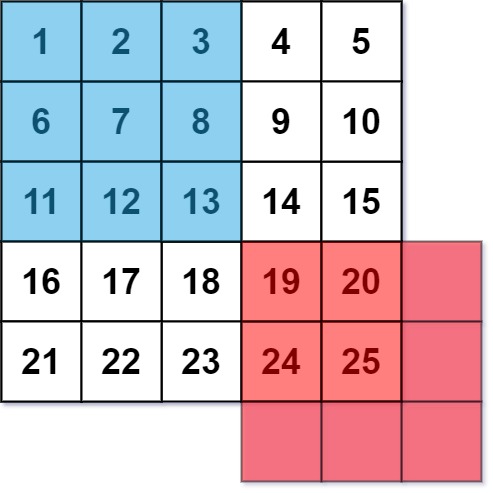
Given an m x n integer matrix img representing the grayscale of an image, return the image after applying the smoother on each cell of it.
Example 1:
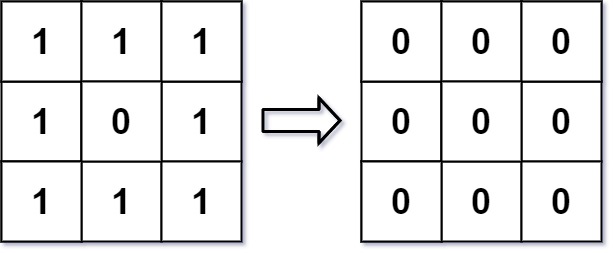
Input: img = [[1,1,1],[1,0,1],[1,1,1]]
Output: [[0,0,0],[0,0,0],[0,0,0]]
Explanation:
For the points (0,0), (0,2), (2,0), (2,2): floor(3/4) = floor(0.75) = 0
For the points (0,1), (1,0), (1,2), (2,1): floor(5/6) = floor(0.83333333) = 0
For the point (1,1): floor(8/9) = floor(0.88888889) = 0
Example 2:
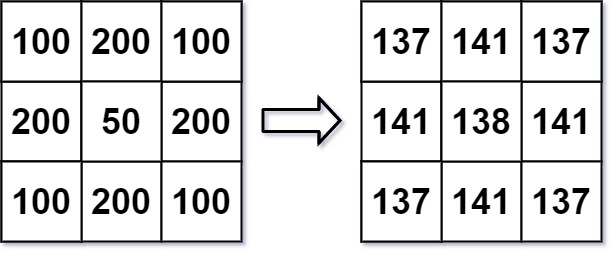
Input: img = [[100,200,100],[200,50,200],[100,200,100]]
Output: [[137,141,137],[141,138,141],[137,141,137]]
Explanation:
For the points (0,0), (0,2), (2,0), (2,2): floor((100+200+200+50)/4) = floor(137.5) = 137
For the points (0,1), (1,0), (1,2), (2,1): floor((200+200+50+200+100+100)/6) = floor(141.666667) = 141
For the point (1,1): floor((50+200+200+200+200+100+100+100+100)/9) = floor(138.888889) = 138
Constraints:
m == img.lengthn == img[i].length1 <= m, n <= 2000 <= img[i][j] <= 255
Approaches
2 approaches with complexity analysis and trade-offs.
This approach directly simulates the process described in the problem. We create a new matrix to store the smoothed image. For each cell in the original image, we calculate the average of its 3x3 neighborhood and store the result in the corresponding cell of the new matrix. Using a separate matrix is crucial to ensure that all calculations are based on the original, unmodified pixel values.
Algorithm
- Get the dimensions of the input image,
m(rows) andn(columns). - Create a new integer matrix
smoothedImgof sizem x n. - Iterate through each cell of the input
imgfrom rowr = 0tom-1. - Inside this loop, iterate from column
c = 0ton-1. - For each cell
(r, c), initializetotalSum = 0andcount = 0. - Iterate through the neighboring rows
ifromr-1tor+1. - Inside this loop, iterate through the neighboring columns
jfromc-1toc+1. - Check if the neighbor coordinates
(i, j)are valid (within the matrix bounds). - If valid, add
img[i][j]tototalSumand incrementcount. - After the neighborhood loops, calculate the smoothed value
totalSum / count(integer division handles the floor). - Assign this value to
smoothedImg[r][c]. - After iterating through all cells, return
smoothedImg.
Walkthrough
We initialize a new result matrix, smoothedImg, with the same dimensions as the input img. We then iterate through every cell (r, c) of the img matrix. For each cell, we define a 3x3 window around it. We iterate through all 9 positions in this window, from (r-1, c-1) to (r+1, c+1). For each position (nr, nc) in the window, we check if it's within the valid bounds of the image (i.e., 0 <= nr < m and 0 <= nc < n). If the position is valid, we add its pixel value img[nr][nc] to a running totalSum and increment a count of valid neighbors. After checking all 9 positions, we compute the average by dividing totalSum by count and take the floor value. This computed value is placed in smoothedImg[r][c]. After iterating through all cells, the smoothedImg matrix contains the final smoothed image and is returned.
class Solution { public int[][] imageSmoother(int[][] img) { int m = img.length; int n = img[0].length; int[][] smoothedImg = new int[m][n]; for (int r = 0; r < m; r++) { for (int c = 0; c < n; c++) { int totalSum = 0; int count = 0; // Iterate over the 3x3 neighborhood for (int i = r - 1; i <= r + 1; i++) { for (int j = c - 1; j <= c + 1; j++) { // Check if the neighbor is within the image bounds if (i >= 0 && i < m && j >= 0 && j < n) { totalSum += img[i][j]; count++; } } } smoothedImg[r][c] = totalSum / count; } } return smoothedImg; }}Complexity
Time
O(m * n). We iterate through each of the `m * n` cells. For each cell, we perform a constant number of operations (iterating through a 3x3 grid, which is 9 checks and additions). Thus, the complexity is proportional to the number of cells in the image.
Space
O(m * n). We allocate a new matrix `smoothedImg` with the same dimensions as the input image to store the results.
Trade-offs
Pros
Simple and straightforward to implement.
The logic directly follows the problem description, making it easy to reason about correctness.
Cons
Requires extra space proportional to the size of the input image, which can be significant for large images.
This approach optimizes the space complexity by modifying the input matrix in-place. Since the original pixel values (0-255) are needed for subsequent calculations, we can't simply overwrite them. Instead, we use bit manipulation to store both the original and the new smoothed value in a single integer cell. The original value is stored in the lower 8 bits, and the new value is stored in the next 8 bits.
Algorithm
- Get the dimensions of the input image,
mandn. - Pass 1: Calculate and Encode
- Iterate through each cell
(r, c)of theimgmatrix. - For each cell, initialize
totalSum = 0andcount = 0. - Iterate through its 3x3 neighborhood
(i, j). - If
(i, j)is a valid coordinate:- Extract the original value of the neighbor using
img[i][j] & 0xFF. - Add this original value to
totalSumand incrementcount.
- Extract the original value of the neighbor using
- Calculate the
smoothedValue = totalSum / count. - Store the
smoothedValuein the higher 8 bits ofimg[r][c]by performing a bitwise OR with the value shifted left by 8:img[r][c] |= (smoothedValue << 8).
- Iterate through each cell
- Pass 2: Decode
- Iterate through each cell
(r, c)of theimgmatrix again. - Update the cell's value to be the smoothed value by right-shifting by 8 bits:
img[r][c] >>= 8.
- Iterate through each cell
- Return the modified
imgmatrix.
Walkthrough
The core idea is to use the 32 bits of an integer to store two 8-bit values. The original pixel value (0-255) fits in 8 bits. The new smoothed value also fits in 8 bits. We can store the new value in bits 8-15 and keep the original value in bits 0-7. The algorithm proceeds in two passes:
First Pass (Calculation and Encoding):
- Iterate through every cell
(r, c)of theimgmatrix. - For each cell, calculate the smoothed value just like in the brute-force approach. However, when accessing a neighbor's value
img[nr][nc], we must retrieve its original value. Since previous cells in the iteration might have already been updated, we extract the original value using the bitwise AND operator:img[nr][nc] & 0xFF. - Once the
smoothedValueis calculated, we encode it into the current cellimg[r][c]. We shift thesmoothedValueleft by 8 bits (smoothedValue << 8) and combine it with the original value using bitwise OR:img[r][c] = img[r][c] | (smoothedValue << 8).
Second Pass (Decoding):
- After the first pass, every cell
img[r][c]contains the new value in its higher bits. - Iterate through the matrix again.
- For each cell, update its value to the smoothed value by shifting it right by 8 bits:
img[r][c] = img[r][c] >> 8.
This modifies the matrix in-place and returns it.
class Solution { public int[][] imageSmoother(int[][] img) { int m = img.length; int n = img[0].length; // First pass: calculate and store new value in higher bits for (int r = 0; r < m; r++) { for (int c = 0; c < n; c++) { int totalSum = 0; int count = 0; for (int i = r - 1; i <= r + 1; i++) { for (int j = c - 1; j <= c + 1; j++) { if (i >= 0 && i < m && j >= 0 && j < n) { // Extract original value from lower 8 bits totalSum += img[i][j] & 0xFF; count++; } } } int smoothedValue = totalSum / count; // Store new value in bits 8-15, original value is already in bits 0-7 img[r][c] |= (smoothedValue << 8); } } // Second pass: update the matrix with the new values for (int r = 0; r < m; r++) { for (int c = 0; c < n; c++) { // Extract the new value from higher bits img[r][c] = img[r][c] >> 8; } } return img; }}Complexity
Time
O(m * n). We traverse the matrix twice. The first pass involves constant work (9 neighborhood checks) for each cell, and the second pass involves a single operation per cell. The total time is `O(m * n) + O(m * n) = O(m * n)`.
Space
O(1). The modifications are done in-place on the input matrix. No auxiliary data structures proportional to the input size are used.
Trade-offs
Pros
Extremely space-efficient, using constant extra space.
Maintains the optimal time complexity.
Cons
The logic is more complex due to bit manipulation.
It modifies the input matrix directly, which might not be desirable in all contexts.
Solutions
Solution
class Solution { public int [][] imageSmoother ( int [][] img ) { int m = img . length ; int n = img [ 0 ]. length ; int [][] ans = new int [ m ][ n ]; for ( int i = 0 ; i < m ; ++ i ) { for ( int j = 0 ; j < n ; ++ j ) { int s = 0 ; int cnt = 0 ; for ( int x = i - 1 ; x <= i + 1 ; ++ x ) { for ( int y = j - 1 ; y <= j + 1 ; ++ y ) { if ( x >= 0 && x < m && y >= 0 && y < n ) { ++ cnt ; s += img [ x ][ y ]; } } } ans [ i ][ j ] = s / cnt ; } } return ans ; } }class Solution {public: vector<vector<int>> imageSmoother(vector<vector<int>> &img) { int m = img.size(), n = img[0].size(); vector<vector<int>> ans(m, vector<int>(n)); for (int i = 0; i < m; ++i) { for (int j = 0; j < n; ++j) { int s = 0, cnt = 0; for (int x = i - 1; x <= i + 1; ++x) { for (int y = j - 1; y <= j + 1; ++y) { if (x < 0 || x >= m || y < 0 || y >= n) continue; ++cnt; s += img[x][y]; } } ans[i][j] = s / cnt; } } return ans; }};class Solution: def imageSmoother(self, img: List[List[int]]) -> List[List[int]]: m, n = len(img), len(img[0]) ans = [[0] * n for _ in range(m)] for i in range(m): for j in range(n): s = cnt = 0 for x in range(i - 1, i + 2): for y in range(j - 1, j + 2): if 0 <= x < m and 0 <= y < n: cnt += 1 s += img[x][y] ans[i][j] = s // cnt return ansVideo walkthrough
Newsletter
One sharp idea, every week
System design and interview prep — short enough to finish.
No spam. Unsubscribe anytime.
Practice
Same difficulty — related problems to reinforce the pattern.