
Reshape the Matrix
EasyPrompt
In MATLAB, there is a handy function called reshape which can reshape an m x n matrix into a new one with a different size r x c keeping its original data.
You are given an m x n matrix mat and two integers r and c representing the number of rows and the number of columns of the wanted reshaped matrix.
The reshaped matrix should be filled with all the elements of the original matrix in the same row-traversing order as they were.
If the reshape operation with given parameters is possible and legal, output the new reshaped matrix; Otherwise, output the original matrix.
Example 1:
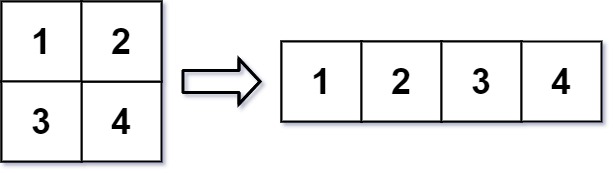
Input: mat = [[1,2],[3,4]], r = 1, c = 4
Output: [[1,2,3,4]]
Example 2:
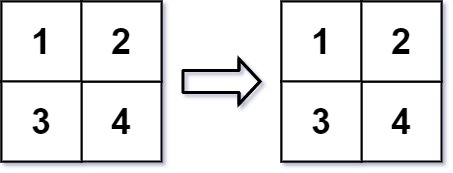
Input: mat = [[1,2],[3,4]], r = 2, c = 4
Output: [[1,2],[3,4]]
Constraints:
m == mat.lengthn == mat[i].length1 <= m, n <= 100-1000 <= mat[i][j] <= 10001 <= r, c <= 300
Approaches
2 approaches with complexity analysis and trade-offs.
This approach involves first flattening the original matrix into a one-dimensional data structure, like a queue or a list, and then constructing the new matrix by polling elements from this structure.
Algorithm
- Check if the total number of elements in the original matrix (
m * n) is equal to the total number of elements in the desired reshaped matrix (r * c). If not, return the original matrix. - Create a queue (e.g.,
LinkedListin Java) to store all elements of the original matrix. - Iterate through the original matrix
matrow by row, and add each elementmat[i][j]into the queue. - Create a new result matrix
reshapedMatof sizer x c. - Iterate through the
reshapedMatfrom(0, 0)to(r-1, c-1). - In each position
(i, j)of the new matrix, place the element removed from the front of the queue (queue.poll()). - Return the
reshapedMat.
Walkthrough
The core idea is to separate the process into two distinct steps: reading and writing. First, we perform the validity check: m * n must equal r * c. If not, the reshape is impossible, and we return the original matrix. If the reshape is possible, we create a queue to store the elements. We iterate through the original m x n matrix, mat, row by row, and add each element to the queue. This effectively linearizes the matrix data in the required row-traversing order. Next, we create a new matrix, reshapedMat, with the desired dimensions r x c. We then iterate through this new matrix, from row = 0 to r-1 and col = 0 to c-1, and for each cell, we poll an element from the front of the queue and place it in reshapedMat[row][col]. Finally, the fully populated reshapedMat is returned.
import java.util.LinkedList;import java.util.Queue; class Solution { public int[][] matrixReshape(int[][] mat, int r, int c) { int m = mat.length; int n = mat[0].length; if (m * n != r * c) { return mat; } Queue<Integer> queue = new LinkedList<>(); for (int i = 0; i < m; i++) { for (int j = 0; j < n; j++) { queue.add(mat[i][j]); } } int[][] reshapedMat = new int[r][c]; for (int i = 0; i < r; i++) { for (int j = 0; j < c; j++) { reshapedMat[i][j] = queue.poll(); } } return reshapedMat; }}Complexity
Time
O(m * n), where `m` and `n` are the dimensions of the original matrix. We traverse the original matrix once to populate the queue (O(m * n)) and then traverse the new matrix once to fill it (O(r * c)). Since `m * n = r * c`, the total time is O(m * n).
Space
O(m * n). An auxiliary queue is used to store all the elements of the original matrix, which requires space proportional to the number of elements.
Trade-offs
Pros
Simple to understand and implement.
The logic is straightforward: flatten then build.
Cons
Requires extra space proportional to the size of the matrix, which can be significant for large matrices.
A more optimized approach avoids using any intermediate data structure. It directly maps the elements from the original matrix to the new matrix by calculating the corresponding indices. This is done by treating the matrix as a flattened 1D array conceptually and filling the new matrix in a single pass.
Algorithm
- Check if
m * nis equal tor * c. If not, return the original matrixmat. - Create a new result matrix
reshapedMatof sizer x c. - Initialize two pointers for the new matrix:
new_row = 0andnew_col = 0. - Iterate through the original matrix
matusing nested loops (fromi = 0tom-1andj = 0ton-1). - For each element
mat[i][j], place it into the new matrix atreshapedMat[new_row][new_col]. - Increment
new_col. - If
new_colbecomes equal toc, resetnew_colto0and incrementnew_row. - After iterating through all elements of
mat, return thereshapedMat.
Walkthrough
This method improves upon the previous one by eliminating the need for an auxiliary data structure, thus optimizing space complexity. First, we perform the same validity check: if m * n != r * c, we return the original matrix mat. If the dimensions are compatible, we create the new r x c matrix, reshapedMat. We then iterate through the original m x n matrix. While doing so, we keep track of the current cell to be filled in the new matrix using two variables, row and col, both initialized to 0. For each element we read from the original matrix, we place it at reshapedMat[row][col]. After placing the element, we advance the column pointer col. If col reaches the end of a row (i.e., col == c), we reset it to 0 and advance the row pointer row. This process continues until all elements from the original matrix have been copied. This way, we fill the new matrix in a single pass without any extra storage.
class Solution { public int[][] matrixReshape(int[][] mat, int r, int c) { int m = mat.length; int n = mat[0].length; if (m * n != r * c) { return mat; } int[][] reshapedMat = new int[r][c]; int row = 0; int col = 0; for (int i = 0; i < m; i++) { for (int j = 0; j < n; j++) { reshapedMat[row][col] = mat[i][j]; col++; if (col == c) { col = 0; row++; } } } return reshapedMat; }}Complexity
Time
O(m * n). We iterate through all `m * n` elements of the original matrix exactly once to fill the new matrix.
Space
O(1) extra space. The space used is for the output matrix, which is typically not counted as extra space. We only use a few variables to keep track of the current position in the new matrix, which is constant space.
Trade-offs
Pros
Highly efficient in terms of space.
Performs the reshape in a single pass over the data.
Cons
The index calculation logic might be slightly less intuitive at first glance compared to the queue-based approach, though the alternative with row/col pointers is very clear.
Solutions
Solution
class Solution {public int[][] matrixReshape(int[][] mat, int r, int c) { int m = mat.length, n = mat[0].length; if (m * n != r * c) { return mat; } int[][] ans = new int[r][c]; for (int i = 0; i < m * n; ++i) { ans[i / c][i % c] = mat[i / n][i % n]; } return ans; }}class Solution {public: vector<vector<int>> matrixReshape(vector<vector<int>> &mat, int r, int c) { int m = mat.size(), n = mat[0].size(); if (m * n != r * c) { return mat; } vector<vector<int>> ans(r, vector<int>(c)); for (int i = 0; i < m * n; ++i) { ans[i / c][i % c] = mat[i / n][i % n]; } return ans; }};class Solution: def matrixReshape(self, mat: List[List[int]], r: int, c: int) -> List[List[int]]: m, n = len(mat), len(mat[0]) if m * n != r * c: return mat ans = [[0] * c for _ in range(r)] for i in range(m * n): ans[i // c][i % c] = mat[i // n][i % n] return ansVideo walkthrough
Newsletter
One sharp idea, every week
System design and interview prep — short enough to finish.
No spam. Unsubscribe anytime.
Practice
Same difficulty — related problems to reinforce the pattern.