
How Snowflake Reduced Query Time by 20% (Without You Doing Anything)
Snowflake reduces query time by 20% via continuous engine optimizations, improving real workloads automatically without user changes.
Imagine running the same query today and then running it again a few months later. Same SQL, same data but this time, it runs 20% faster. You didn’t optimize it, you didn’t rewrite anything but it just got faster. This is exactly what Snowflake has been achieving and they track this improvement using something called the Snowflake Performance Index (SPI). Let’s discover how Snowflake did it in this blog today.
If you’ve read our earlier blog on how Snowflake improved overall performance by 27%, this is a continuation of that story. That blog explored what kinds of optimizations Snowflake made. This one focuses on how those improvements translate into real-world query performance over time, measured using the Snowflake Performance Index (SPI).
In case you missed the blog: How Snowflake Improved Performance by 27% (Without Users Noticing)
What is the Snowflake Performance Index (SPI)?
The Snowflake Performance Index (SPI) is a metric designed to measure, “How much faster Snowflake is getting over time for real customer workloads“.
Now, this is important because most companies measure performance using:
synthetic benchmarks
controlled test environments
But Snowflake does something different. Instead of testing in ideal conditions, SPI tracks real queries running on real production workloads due to which this approach gives the best results because real-world workloads are unpredictable, complex and constantly changing. So if performance improves there, it actually means something.
SPI focuses specifically on:
stable workloads (same type of queries over time)
similar data volume
consistent query patterns
This allows Snowflake to compare performance fairly across time.
What do the Numbers Say?
Based on Snowflake’s internal data:
Query duration improved 11% in one year
Up to 20% improvement since SPI tracking began
and this isn’t a one-time spike. It reflects continuous, steady improvement in how queries execute over time
So, how Snowflake did it?
One of the most important ideas here is Snowflake’s approach to performance. They don’t rely on big upgrades, migrations and manual tuning. Instead, they focus on continuously improving the core database engine. These improvements are shipped through weekly releases
What this means for users is that every week small improvements are deployed that are automatically applied to your workloads. So over time your queries just become faster. No action required from users end.
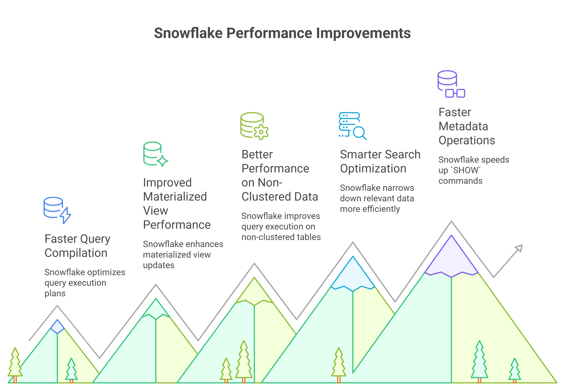
What Actually Improved Under the Hood?

1.Faster and Smarter Query Compilation
Before any query runs, Snowflake first compiles it. This step decides how the query will execute and how data will be processed. Snowflake improved this phase in multiple ways.
What changed?
It avoids unnecessary optimization steps when they’re not needed
It evaluates SQL expressions more efficiently
It improves compilation for queries using materialized views
If compilation is faster, queries start executing sooner and overall latency drops. It’s like reducing the “thinking time” before doing the actual work.
2. Improved Materialized View Performance
Materialized views are precomputed results that help speed up queries. But maintaining them can be expensive. Snowflake improved how efficiently they are updated and how queries interact with them
Result
faster query performance
reduced compute overhead
So you get the benefit of precomputed data without paying a high maintenance cost.
3. Better Performance on Non-Clustered Data
In an ideal world, data is perfectly organized but in reality most data is not clustered optimally. Earlier, queries on such data could be slower. Now, Snowflake improved how queries run on non-clustered tables.
This matters because most real-world datasets are messy and don’t follow perfect structure. Improving performance here means better performance for real use cases, not just ideal ones.
4. Smarter Search Optimization
Snowflake introduced improved search optimization techniques. Instead of scanning large chunks of data, the system can quickly narrow down relevant data
Result
less data scanned
faster query execution
This is essentially about doing less work to get the same result.
5. Faster Metadata Operations (SHOW Commands)
Snowflake also improved the performance of SHOW commands. These are used to:
inspect tables
check schemas
understand system state
This matters because even though these are not heavy queries, they are used frequently and they impact developer workflows. Basically faster metadata operations improve overall user experience!
The Bigger Picture
None of these individual improvements alone results in a 20% performance gain. But when you combine them, they create a compounding effect.
That’s the key idea here:
Many small optimizations across different parts of the system can together lead to significant overall improvements.
This is exactly how Snowflake achieves consistent performance gains over time, not through one big change, but through continuous, incremental enhancements.
How Snowflake Measures this Fairly
Snowflake doesn’t just claim performance improvements, it measures them carefully. To ensure accuracy, it follows a structured approach:
Identify stable workloads
Ensure similar query patterns
Keep data volume consistent
Track query duration over time
This approach ensures:
fair comparison under the same conditions
actual performance improvements (not artificial gains)
no misleading benchmarks
In other words, Snowflake isn’t just making things faster, it’s proving that real-world workloads are actually improving over time.
Takeaways
Continuous optimization beats big releases Instead of relying on occasional major upgrades, Snowflake delivers small, frequent improvements that compound into significant gains over time.
Optimize the engine, not the user Great systems improve internally so users don’t have to tune queries or change configurations to get better performance.
Measure real workloads, not benchmarks Synthetic benchmarks can be misleading. Tracking real customer workloads ensures improvements actually matter in production.
Eliminate unnecessary work Skipping redundant optimization steps and avoiding extra computation directly improves performance without adding more resources.
Small gains compound over time Individual improvements may seem minor, but together they create a noticeable and meaningful impact on overall system performance.
Official blog from Snowflake: Snowflake Improves Query Duration by 20% on Stable Workloads Since We Began Tracking the Snowflake Performance Index
By now, you must have had a clear idea of, How Snowflake Reduced Query Time by 20%? In a nutshell, Snowflake improves query performance by continuously optimizing its core engine and measuring real-world impact using SPI. These incremental improvements reduce query duration by up to 20% without requiring any user changes.
Congratulations! You've just advanced another step in your tech journey. Keep progressing!