
Flood Fill
EasyPrompt
You are given an image represented by an m x n grid of integers image, where image[i][j] represents the pixel value of the image. You are also given three integers sr, sc, and color. Your task is to perform a flood fill on the image starting from the pixel image[sr][sc].
To perform a flood fill:
- Begin with the starting pixel and change its color to
color. - Perform the same process for each pixel that is directly adjacent (pixels that share a side with the original pixel, either horizontally or vertically) and shares the same color as the starting pixel.
- Keep repeating this process by checking neighboring pixels of the updated pixels and modifying their color if it matches the original color of the starting pixel.
- The process stops when there are no more adjacent pixels of the original color to update.
Return the modified image after performing the flood fill.
Example 1:
Input: image = [[1,1,1],[1,1,0],[1,0,1]], sr = 1, sc = 1, color = 2
Output: [[2,2,2],[2,2,0],[2,0,1]]
Explanation:
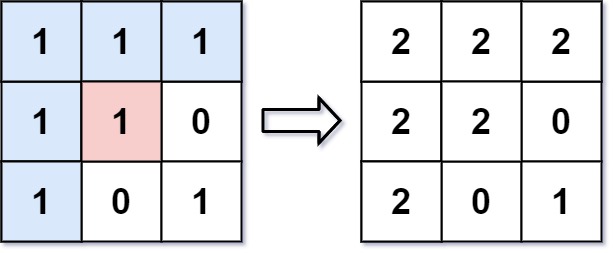
From the center of the image with position (sr, sc) = (1, 1) (i.e., the red pixel), all pixels connected by a path of the same color as the starting pixel (i.e., the blue pixels) are colored with the new color.
Note the bottom corner is not colored 2, because it is not horizontally or vertically connected to the starting pixel.
Example 2:
Input: image = [[0,0,0],[0,0,0]], sr = 0, sc = 0, color = 0
Output: [[0,0,0],[0,0,0]]
Explanation:
The starting pixel is already colored with 0, which is the same as the target color. Therefore, no changes are made to the image.
Constraints:
m == image.lengthn == image[i].length1 <= m, n <= 500 <= image[i][j], color < 2160 <= sr < m0 <= sc < n
Approaches
2 approaches with complexity analysis and trade-offs.
This approach utilizes recursion to perform a Depth-First Search (DFS) starting from the given pixel. It explores as far as possible along each branch before backtracking. The system's call stack is implicitly used to keep track of the pixels to visit.
Algorithm
- Get the color of the starting pixel
(sr, sc), let's call itinitialColor. - If
initialColoris the same as the targetcolor, return the image as no changes are needed. This check is crucial to prevent infinite recursion. - Create a recursive helper function
dfs(image, r, c, initialColor, color). - Inside
dfs:- Check for boundary conditions: if
rorcis out of bounds, return. - Check for color condition: if
image[r][c]is not equal toinitialColor, return. - If the conditions are passed, update the pixel's color:
image[r][c] = color. - Make recursive calls for the four neighbors:
dfs(r+1, c),dfs(r-1, c),dfs(r, c+1),dfs(r, c-1).
- Check for boundary conditions: if
- Start the process by calling
dfs(image, sr, sc, initialColor, color). - Return the modified
image.
Walkthrough
The core idea is to have a recursive function that explores the grid. First, we check an important edge case: if the starting pixel's color is already the target color, no action is needed, and we can return the image immediately. This prevents infinite recursion. We store the original color of the starting pixel. We then call a recursive helper function, let's call it dfs. The dfs function takes the image, current coordinates (row, col), the original color, and the new color as arguments.
Base Cases for recursion: The function returns if the current coordinates are out of the grid's bounds, or if the color of the pixel at the current coordinates is not the original color we are trying to replace.
Recursive Step: If the base cases are not met, we update the color of the current pixel to the new color. Then, we make four recursive calls for the adjacent pixels (up, down, left, and right) to continue the flood fill process.
class Solution { public int[][] floodFill(int[][] image, int sr, int sc, int color) { int initialColor = image[sr][sc]; if (initialColor != color) { dfs(image, sr, sc, initialColor, color); } return image; } private void dfs(int[][] image, int r, int c, int initialColor, int newColor) { if (r < 0 || r >= image.length || c < 0 || c >= image[0].length || image[r][c] != initialColor) { return; } image[r][c] = newColor; dfs(image, r + 1, c, initialColor, newColor); dfs(image, r - 1, c, initialColor, newColor); dfs(image, r, c + 1, initialColor, newColor); dfs(image, r, c - 1, initialColor, newColor); }}Complexity
Time
`O(N * M)`, where `N` is the number of rows and `M` is the number of columns. In the worst-case scenario, we might have to visit every pixel in the grid.
Space
`O(N * M)` in the worst case. This is due to the recursion depth of the call stack. If the area to be filled forms a long, winding path, the stack depth could be proportional to the number of pixels in the grid.
Trade-offs
Pros
The recursive implementation is often very intuitive and leads to concise code for graph traversal problems.
It's easy to reason about the logic.
Cons
For large grids or deeply connected components, this approach can lead to a
StackOverflowErrorif the recursion depth exceeds the system's stack limit.
This approach uses an iterative Breadth-First Search (BFS) algorithm with a queue data structure. It explores the neighbors of the starting pixel level by level, which is more robust against stack overflow issues compared to a recursive DFS.
Algorithm
- Get the color of the starting pixel
(sr, sc), let's call itinitialColor. - If
initialColoris the same as the targetcolor, return the image. - Create a queue and add the starting coordinates
(sr, sc). - Update the starting pixel's color:
image[sr][sc] = color. - While the queue is not empty:
- Dequeue a pixel
(r, c). - For each of its four neighbors
(nr, nc):- Check if the neighbor is within the grid boundaries.
- Check if the neighbor's color
image[nr][nc]is equal toinitialColor. - If both checks pass, update the neighbor's color to
colorand enqueue the neighbor(nr, nc).
- Dequeue a pixel
- Return the modified
image.
Walkthrough
Similar to the DFS approach, we first handle the edge case where the starting pixel's color is already the target color. We store the initialColor of the pixel at (sr, sc). We initialize a queue (e.g., a LinkedList in Java) and add the starting coordinates (sr, sc) to it. We immediately change the color of the starting pixel image[sr][sc] to the new color. This is crucial to prevent adding the same pixel to the queue multiple times. We then enter a loop that continues as long as the queue is not empty. Inside the loop, we dequeue a pixel's coordinates. For this pixel, we examine its four neighbors (up, down, left, right). For each neighbor, we check if it's within the grid boundaries and if its color matches the initialColor. If a neighbor is valid (within bounds and has the correct color), we update its color to the new color and enqueue its coordinates for future processing. This process continues until the queue is empty, at which point all reachable pixels with the initialColor have been visited and recolored.
import java.util.Queue;import java.util.LinkedList; class Solution { public int[][] floodFill(int[][] image, int sr, int sc, int color) { int initialColor = image[sr][sc]; if (initialColor == color) { return image; } int m = image.length; int n = image[0].length; Queue<int[]> queue = new LinkedList<>(); queue.offer(new int[]{sr, sc}); image[sr][sc] = color; int[][] directions = {{1, 0}, {-1, 0}, {0, 1}, {0, -1}}; while (!queue.isEmpty()) { int[] currentPixel = queue.poll(); int r = currentPixel[0]; int c = currentPixel[1]; for (int[] dir : directions) { int newRow = r + dir[0]; int newCol = c + dir[1]; if (newRow >= 0 && newRow < m && newCol >= 0 && newCol < n && image[newRow][newCol] == initialColor) { image[newRow][newCol] = color; queue.offer(new int[]{newRow, newCol}); } } } return image; }}Complexity
Time
`O(N * M)`, where `N` is the number of rows and `M` is the number of columns. Each pixel is enqueued and dequeued at most once.
Space
`O(N * M)` in the worst case. The space is used by the queue. The maximum size of the queue can be proportional to the number of pixels in the grid, for example, in a checkerboard-like pattern.
Trade-offs
Pros
It is guaranteed to find the shortest path in terms of edges from the source (though not relevant for this problem).
It avoids the risk of
StackOverflowErrorthat can occur with deep recursion, making it more robust for large inputs.
Cons
The code can be slightly more verbose than the recursive DFS approach due to the explicit management of the queue.
Solutions
Solution
class Solution {private int[] dirs = {-1, 0, 1, 0, -1};private int[][] image;private int nc;private int oc;public int[][] floodFill(int[][] image, int sr, int sc, int color) { nc = color; oc = image[sr][sc]; this.image = image; dfs(sr, sc); return image; }private void dfs(int i, int j) { if (i < 0 || i >= image.length || j < 0 || j >= image[0].length || image[i][j] != oc || image[i][j] == nc) { return; } image[i][j] = nc; for (int k = 0; k < 4; ++k) { dfs(i + dirs[k], j + dirs[k + 1]); } }}class Solution {public: vector<vector<int>> floodFill(vector<vector<int>> &image, int sr, int sc, int color) { int m = image.size(), n = image[0].size(); int oc = image[sr][sc]; int dirs[5] = {-1, 0, 1, 0, -1}; function<void(int, int)> dfs = [&](int i, int j) { if (i < 0 || i >= m || j < 0 || j >= n || image[i][j] != oc || image[i][j] == color) { return; } image[i][j] = color; for (int k = 0; k < 4; ++k) { dfs(i + dirs[k], j + dirs[k + 1]); } }; dfs(sr, sc); return image; }};class Solution: def floodFill(self, image: List[List[int]], sr: int, sc: int, color: int) -> List[List[int]]: def dfs(i, j): if (not 0 <= i < m or not 0 <= j < n or image[i][j] != oc or image[i][j] == color): return image[i][j] = color for a, b in pairwise(dirs): dfs(i + a, j + b) dirs = (- 1, 0, 1, 0, - 1) m, n = len(image), len(image[0]) oc = image[sr][sc] dfs(sr, sc) return imageVideo walkthrough
Newsletter
One sharp idea, every week
System design and interview prep — short enough to finish.
No spam. Unsubscribe anytime.
Practice
Same difficulty — related problems to reinforce the pattern.