
Keyboard Row
EasyPrompt
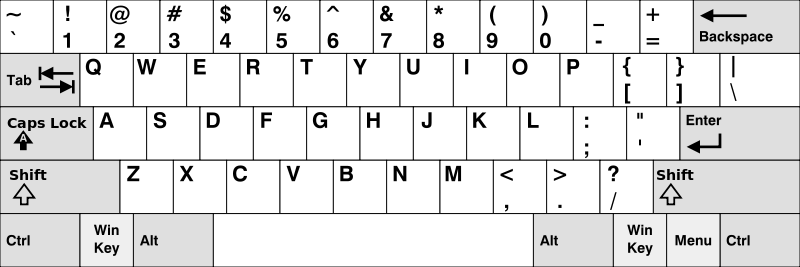
Given an array of strings words, return the words that can be typed using letters of the alphabet on only one row of American keyboard like the image below.
Note that the strings are case-insensitive, both lowercased and uppercased of the same letter are treated as if they are at the same row.
In the American keyboard:
- the first row consists of the characters
"qwertyuiop", - the second row consists of the characters
"asdfghjkl", and - the third row consists of the characters
"zxcvbnm".
Example 1:
Input: words = ["Hello","Alaska","Dad","Peace"]
Output: ["Alaska","Dad"]
Explanation:
Both "a" and "A" are in the 2nd row of the American keyboard due to case insensitivity.
Example 2:
Input: words = ["omk"]
Output: []
Example 3:
Input: words = ["adsdf","sfd"]
Output: ["adsdf","sfd"]
Constraints:
1 <= words.length <= 201 <= words[i].length <= 100words[i]consists of English letters (both lowercase and uppercase).
Approaches
3 approaches with complexity analysis and trade-offs.
This approach uses a straightforward, brute-force method. We define three strings, one for each row of the keyboard. For each word in the input array, we check if all its characters belong to the first row. If not, we check if they all belong to the second row, and finally, the third row. This check is done by iterating through the word's characters and using string searching methods like indexOf to see if a character is present in the row string.
Algorithm
- Initialize an empty list
resultto store the valid words. - Define three strings:
row1 = "qwertyuiop",row2 = "asdfghjkl", androw3 = "zxcvbnm". - For each
wordin the inputwordsarray, check if it can be typed using only characters fromrow1,row2, orrow3. - To do this, create a helper function
isTypable(word, row)that iterates through each character of theword(converted to lowercase) and checks if the character exists in the givenrowstring usingrow.indexOf(char). - If
isTypablereturns true for any of the three rows, add the originalwordto theresultlist. - After iterating through all words, convert the
resultlist to a string array and return it.
Walkthrough
The core idea is to test each word against each of the three keyboard rows. We can write a helper function that takes a word and a row string. This function will iterate through every character of the word (after converting it to lowercase for case-insensitivity) and check if that character is present in the row string. If it finds any character that is not in the row, it immediately returns false. If all characters are found in the row, it returns true. The main function then calls this helper for each word with each of the three rows. If any of the calls return true, the word is added to our result list.
import java.util.ArrayList;import java.util.List; class Solution { public String[] findWords(String[] words) { String row1 = "qwertyuiop"; String row2 = "asdfghjkl"; String row3 = "zxcvbnm"; List<String> result = new ArrayList<>(); for (String word : words) { if (isTypable(word.toLowerCase(), row1) || isTypable(word.toLowerCase(), row2) || isTypable(word.toLowerCase(), row3)) { result.add(word); } } return result.toArray(new String[0]); } private boolean isTypable(String word, String row) { for (char c : word.toCharArray()) { if (row.indexOf(c) == -1) { return false; } } return true; }}Complexity
Time
O(N * L * R), where N is the number of words, L is the maximum length of a word, and R is the length of a keyboard row string. For each character in each word, we might call `row.indexOf()`, which takes O(R) time in the worst case.
Space
O(K), where K is the number of valid words. The space is dominated by the list used to store the results. The space for the row strings is constant.
Trade-offs
Pros
Simple to understand and implement with minimal setup.
Requires very little extra space, aside from the result list.
Cons
This approach is inefficient because it involves repeated linear scans of the row strings. The
indexOforcontainsmethod on a string has a time complexity proportional to the length of the string, leading to a higher overall time complexity.
This approach improves upon the brute-force method by using a more efficient data structure for checking character membership. We pre-process the keyboard rows into three HashSets. A HashSet provides average O(1) time complexity for containment checks (contains() method), which is much faster than scanning a string. The overall logic remains similar: for each word, determine the row of the first letter and then verify that all subsequent letters belong to that same row.
Algorithm
- Create three
HashSet<Character>objects, one for each keyboard row. - Populate each set with the characters from its corresponding row string.
- Initialize an empty list
resultto store valid words. - Iterate through each
wordin the inputwordsarray. - For each
word, convert it to lowercase. If the word is empty or has one character, it's valid by default. - Determine the row of the first character by checking which of the three sets contains it. Let's call this the
targetRow. - Iterate from the second character to the end of the word.
- For each character, check if it is present in the
targetRowset usingcontains(). - If any character is not in the
targetRow, the word is invalid. Stop checking this word and proceed to the next. - If the loop completes successfully, the word is valid. Add the original
wordto theresultlist. - Convert the
resultlist to an array and return.
Walkthrough
Instead of repeatedly scanning strings, we can perform lookups in constant time. We start by initializing three HashSet<Character>s and populating them with the letters of each keyboard row. Then, for each word, we find the row of its first character by checking for its presence in the three sets. Once the correct row's set is identified, we iterate through the rest of the word's characters. For each character, we perform an O(1) contains() check on that set. If all characters are found in the same set, the word is valid.
import java.util.ArrayList;import java.util.HashSet;import java.util.List;import java.util.Set; class Solution { public String[] findWords(String[] words) { Set<Character> row1 = new HashSet<>(Set.of('q', 'w', 'e', 'r', 't', 'y', 'u', 'i', 'o', 'p')); Set<Character> row2 = new HashSet<>(Set.of('a', 's', 'd', 'f', 'g', 'h', 'j', 'k', 'l')); Set<Character> row3 = new HashSet<>(Set.of('z', 'x', 'c', 'v', 'b', 'n', 'm')); List<String> result = new ArrayList<>(); for (String word : words) { if (word.isEmpty()) continue; String lowerWord = word.toLowerCase(); char firstChar = lowerWord.charAt(0); Set<Character> targetRow = null; if (row1.contains(firstChar)) { targetRow = row1; } else if (row2.contains(firstChar)) { targetRow = row2; } else { targetRow = row3; } boolean isValid = true; for (int i = 1; i < lowerWord.length(); i++) { if (!targetRow.contains(lowerWord.charAt(i))) { isValid = false; break; } } if (isValid) { result.add(word); } } return result.toArray(new String[0]); }}Complexity
Time
O(N * L), where N is the number of words and L is the maximum length of a word. The setup of the HashSets takes constant time. For each word, we iterate through its characters, and each character lookup in the set is an O(1) operation on average.
Space
O(K), where K is the number of valid words. The space for the three HashSets is constant O(1) because the number of keys (letters of the alphabet) is fixed.
Trade-offs
Pros
Significantly faster than the string searching approach due to O(1) average time complexity for lookups.
The logic remains clear and easy to follow.
Cons
Has a slightly higher constant space and time overhead for creating and managing hash sets compared to a simple array map.
This is the most optimized approach. It involves pre-computing the row index for every character of the alphabet and storing it in a lookup table, such as a HashMap or a simple array. An array is particularly efficient for this, as we can map each character 'a' through 'z' to an index 0 through 25. This gives us O(1) lookup time with minimal overhead, making it faster in practice than using a HashMap or HashSet due to better cache locality and the absence of hashing.
Algorithm
- Create a mapping from each character to its row number. An integer array of size 26 is ideal for this, acting as a direct-access table.
- Populate this array. For example, iterate through the characters of
"qwertyuiop"and set their corresponding array index (c - 'a') to1. Do the same for the other two rows with values2and3. - Initialize an empty list
resultfor the valid words. - Iterate through each
wordin the inputwordsarray. - Get the row index of the first character of the word (after converting to lowercase) from the pre-computed array.
- Assume the word is valid. Iterate through the remaining characters of the word.
- For each character, look up its row index in the array.
- If any character's row index does not match the row index of the first character, the word is invalid. Break the inner loop and move to the next word.
- If the loop finishes without finding any mismatched characters, the word is valid. Add the original
wordto theresultlist. - Finally, convert the
resultlist to an array and return it.
Walkthrough
The key to this approach is a one-time setup of a lookup table that maps every lowercase letter to its keyboard row number. An array of size 26 is perfect for this. We can assign 1, 2, and 3 as the row numbers. After this setup, we process each word. For a given word, we find the row number of its first character using our lookup table. Then, we iterate through the rest of the characters, and for each one, we look up its row number. If we ever find a character whose row number doesn't match the first one's, we know the word is invalid and can immediately move on to the next word. If we get through the entire word without a mismatch, we add it to our results.
import java.util.ArrayList;import java.util.List; class Solution { public String[] findWords(String[] words) { int[] rowMap = new int[26]; // Assign row numbers (e.g., 1, 2, 3) to each character for (char c : "qwertyuiop".toCharArray()) rowMap[c - 'a'] = 1; for (char c : "asdfghjkl".toCharArray()) rowMap[c - 'a'] = 2; for (char c : "zxcvbnm".toCharArray()) rowMap[c - 'a'] = 3; List<String> result = new ArrayList<>(); for (String word : words) { if (word.isEmpty()) continue; String lowerWord = word.toLowerCase(); int firstCharRow = rowMap[lowerWord.charAt(0) - 'a']; boolean isValid = true; for (int i = 1; i < lowerWord.length(); i++) { if (rowMap[lowerWord.charAt(i) - 'a'] != firstCharRow) { isValid = false; break; } } if (isValid) { result.add(word); } } return result.toArray(new String[0]); }}Complexity
Time
O(N * L), where N is the number of words and L is the maximum length of a word. The setup of the lookup array is a constant time operation. Each character lookup is a direct array access, which is O(1) and extremely fast.
Space
O(K), where K is the number of valid words. The space for the lookup array is constant O(1) (size 26).
Trade-offs
Pros
Most efficient in terms of both time and space.
Array lookups are extremely fast (true O(1)) and generally outperform hash-based lookups due to better cache performance and no risk of hash collisions.
Minimal memory overhead for the lookup table.
Cons
Requires a small amount of pre-computation, but this is negligible and done only once.
Solutions
Solution
public class Solution { public string[] FindWords(string[] words) { string s = "12210111011122000010020202"; IList < string > ans = new List < string > (); foreach(string w in words) { char x = s[char.ToLower(w[0]) - 'a']; bool ok = true; for (int i = 1; i < w.Length; ++i) { if (s[char.ToLower(w[i]) - 'a'] != x) { ok = false; break; } } if (ok) { ans.Add(w); } } return ans.ToArray(); }}class Solution {public String[] findWords(String[] words) { String s = "12210111011122000010020202"; List<String> ans = new ArrayList<>(); for (var w : words) { String t = w.toLowerCase(); char x = s.charAt(t.charAt(0) - 'a'); boolean ok = true; for (char c : t.toCharArray()) { if (s.charAt(c - 'a') != x) { ok = false; break; } } if (ok) { ans.add(w); } } return ans.toArray(new String[0]); }}class Solution {public: vector<string> findWords(vector<string> &words) { string s = "12210111011122000010020202"; vector<string> ans; for (auto &w : words) { char x = s[tolower(w[0]) - 'a']; bool ok = true; for (char &c : w) { if (s[tolower(c) - 'a'] != x) { ok = false; break; } } if (ok) { ans.emplace_back(w); } } return ans; }};class Solution: def findWords(self, words: List[str]) -> List[str]: ans = [] s = "12210111011122000010020202" for w in words: x = s[ord(w[0]. lower()) - ord('a')] if all(s[ord(c . lower()) - ord('a')] == x for c in w): ans . append(w) return ansVideo walkthrough
Newsletter
One sharp idea, every week
System design and interview prep — short enough to finish.
No spam. Unsubscribe anytime.
Practice
Same difficulty — related problems to reinforce the pattern.