
Shift 2D Grid
EasyPrompt
Given a 2D grid of size m x n and an integer k. You need to shift the grid k times.
In one shift operation:
- Element at
grid[i][j]moves togrid[i][j + 1]. - Element at
grid[i][n - 1]moves togrid[i + 1][0]. - Element at
grid[m - 1][n - 1]moves togrid[0][0].
Return the 2D grid after applying shift operation k times.
Example 1:
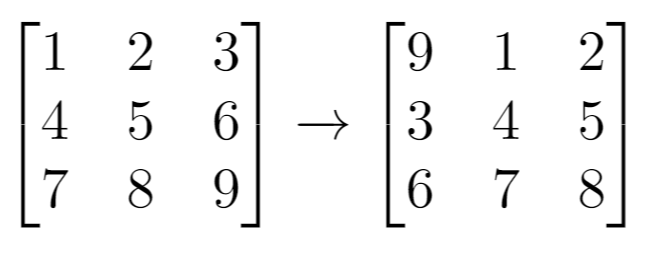
gridExample 2:
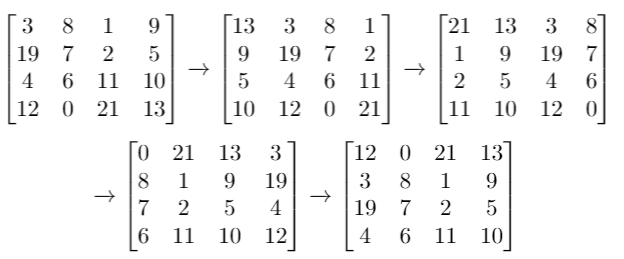
gridExample 3:
grid
Constraints:
m == grid.lengthn == grid[i].length1 <= m <= 501 <= n <= 50-1000 <= grid[i][j] <= 10000 <= k <= 100
Approaches
3 approaches with complexity analysis and trade-offs.
This approach directly simulates the shifting process as described in the problem. It iterates k times, and in each iteration, it calculates the new position of every element after one shift and stores it in a temporary grid. After all elements are moved, the temporary grid's contents are copied back to the original grid for the next iteration.
Algorithm
- Loop
ktimes to simulate each shift. - In each iteration, create a new temporary grid
tempGridof sizem x n. - Iterate through each cell
(i, j)of the inputgrid. - Calculate the new position
(newI, newJ)after one single shift:- If
j < n - 1, the element moves to(i, j + 1). - If
j == n - 1andi < m - 1, the element moves to(i + 1, 0). - If
i == m - 1andj == n - 1, the element moves to(0, 0).
- If
- Place the element
grid[i][j]intotempGridat the calculated new position. - After iterating through all cells, replace the original
gridwithtempGrid. - After
kiterations, convert the finalgridinto aList<List<Integer>>and return it.
Walkthrough
The algorithm performs the shift operation k times. For each of the k steps, a new m x n grid, newGrid, is created to store the state after one shift. We iterate through each cell (i, j) of the current grid. The value grid[i][j] is placed into its new position in newGrid based on the shift rules. After iterating through all cells, the grid is updated with the contents of newGrid. This process is repeated k times. Finally, the grid is converted to the required list format.
class Solution { public List<List<Integer>> shiftGrid(int[][] grid, int k) { int m = grid.length; int n = grid[0].length; for (int shift = 0; shift < k; shift++) { int[][] newGrid = new int[m][n]; // Case 1: Element at grid[i][j] moves to grid[i][j + 1] for (int i = 0; i < m; i++) { for (int j = 0; j < n - 1; j++) { newGrid[i][j + 1] = grid[i][j]; } } // Case 2: Element at grid[i][n - 1] moves to grid[i + 1][0] for (int i = 0; i < m - 1; i++) { newGrid[i + 1][0] = grid[i][n - 1]; } // Case 3: Element at grid[m - 1][n - 1] moves to grid[0][0] newGrid[0][0] = grid[m - 1][n - 1]; grid = newGrid; } List<List<Integer>> result = new ArrayList<>(); for (int[] row : grid) { List<Integer> listRow = new ArrayList<>(); for (int cell : row) { listRow.add(cell); } result.add(listRow); } return result; }}Complexity
Time
O(k * m * n). For each of the `k` shifts, we iterate over all `m * n` elements.
Space
O(m * n). A temporary grid of size `m * n` is created in each of the `k` iterations.
Trade-offs
Pros
Simple to understand and implement as it directly follows the problem description.
Cons
Highly inefficient for large values of
k, as the entire grid is processedktimes.Creates a new grid in every iteration, leading to high memory churn.
Solutions
Solution
class Solution {public List<List<Integer>> shiftGrid(int[][] grid, int k) { int m = grid.length, n = grid[0].length; List<List<Integer>> ans = new ArrayList<>(); for (int i = 0; i < m; ++i) { List<Integer> row = new ArrayList<>(); for (int j = 0; j < n; ++j) { row.add(0); } ans.add(row); } for (int i = 0; i < m; ++i) { for (int j = 0; j < n; ++j) { int idx = (i * n + j + k) % (m * n); int x = idx / n, y = idx % n; ans.get(x).set(y, grid[i][j]); } } return ans; }}Video walkthrough
Newsletter
One sharp idea, every week
System design and interview prep — short enough to finish.
No spam. Unsubscribe anytime.
Practice
Same difficulty — related problems to reinforce the pattern.