
Cyclically Rotating a Grid
MedPrompt
You are given an m x n integer matrix grid, where m and n are both even integers, and an integer k.
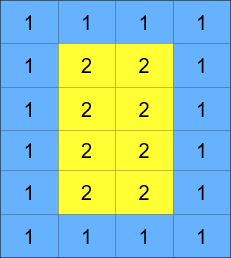
The matrix is composed of several layers, which is shown in the below image, where each color is its own layer:
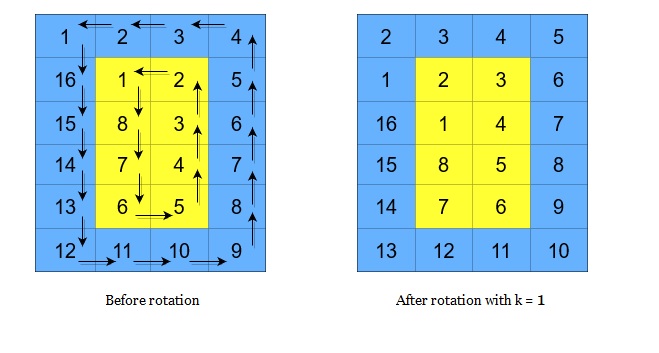
A cyclic rotation of the matrix is done by cyclically rotating each layer in the matrix. To cyclically rotate a layer once, each element in the layer will take the place of the adjacent element in the counter-clockwise direction. An example rotation is shown below:
Return the matrix after applying k cyclic rotations to it.
Example 1:
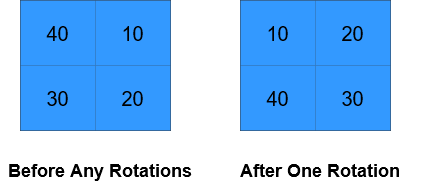
Input: grid = [[40,10],[30,20]], k = 1
Output: [[10,20],[40,30]]
Explanation: The figures above represent the grid at every state.
Example 2:
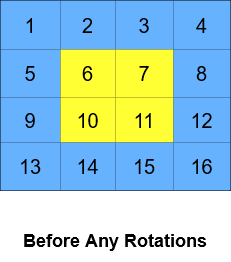
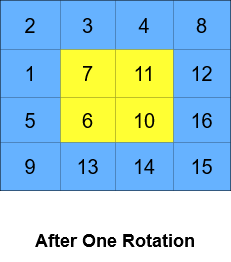
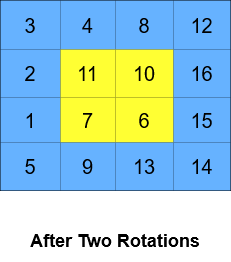
Input: grid = [[1,2,3,4],[5,6,7,8],[9,10,11,12],[13,14,15,16]], k = 2
Output: [[3,4,8,12],[2,11,10,16],[1,7,6,15],[5,9,13,14]]
Explanation: The figures above represent the grid at every state.
Constraints:
m == grid.lengthn == grid[i].length2 <= m, n <= 50- Both
mandnare even integers. 1 <= grid[i][j] <= 50001 <= k <= 109
Approaches
2 approaches with complexity analysis and trade-offs.
This approach directly simulates the process described in the problem. It performs the cyclic rotation k times, one rotation at a time for each layer. While simple to conceptualize, its performance is directly tied to the value of k, making it unsuitable for large rotation counts.
Algorithm
- Loop
countfrom 1 tok. - Inside the loop, iterate through each layer
ifrom0tomin(m, n) / 2 - 1. - For each layer, perform one counter-clockwise rotation. This is done by:
- Saving the top-left element
grid[i][i]in a temporary variable. - Shifting elements on the top edge to the left.
- Shifting elements on the right edge upwards.
- Shifting elements on the bottom edge to the right.
- Shifting elements on the left edge downwards.
- Placing the saved temporary element into its new position
grid[i+1][i].
- Saving the top-left element
- After the loops complete, return the modified
grid.
Walkthrough
The main idea is to have a loop that runs k times. Inside this loop, we iterate through each layer of the grid. The number of layers is determined by min(m, n) / 2. For each layer, we perform a single counter-clockwise rotation. This can be done in-place by saving one element (e.g., the top-left corner) in a temporary variable and then shifting all other elements one by one along the layer's boundary. This entire process of rotating every layer once is repeated k times.
class Solution { public int[][] rotateGrid(int[][] grid, int k) { int m = grid.length; int n = grid[0].length; // This outer loop makes the approach inefficient. for (int rot = 0; rot < k; rot++) { for (int i = 0; i < Math.min(m, n) / 2; i++) { int top = i, left = i; int bottom = m - 1 - i, right = n - 1 - i; // Store top-left element int temp = grid[top][left]; // Shift top row (left to right) for (int j = left; j < right; j++) { grid[top][j] = grid[top][j + 1]; } // Shift right column (bottom to top) for (int j = top; j < bottom; j++) { grid[j][right] = grid[j + 1][right]; } // Shift bottom row (right to left) for (int j = right; j > left; j--) { grid[bottom][j] = grid[bottom][j - 1]; } // Shift left column (top to bottom) for (int j = bottom; j > top + 1; j--) { grid[j][left] = grid[j - 1][left]; } // Place stored element grid[top + 1][left] = temp; } } return grid; }}Complexity
Time
O(k * m * n). For each of the `k` rotations, we iterate through almost all `m * n` cells of the grid. This is very slow when `k` is large.
Space
O(1). The rotation is performed in-place, using only a few extra variables for layer boundaries and temporary storage during swaps.
Trade-offs
Pros
Simple to understand and implement as it directly follows the problem's description of a single rotation.
Space efficient, as it performs the rotation in-place with
O(1)extra space.
Cons
Extremely inefficient for large values of
kas it performskfull passes over the grid.Will result in a 'Time Limit Exceeded' error for the given constraints on
k.
This approach avoids the costly simulation by calculating the final state of each layer directly. It leverages the property of modular arithmetic: rotating a layer with L elements k times is equivalent to rotating it k % L times. This reduces the problem from k operations to a single, efficient operation per layer.
Algorithm
- Iterate through each layer
ifrom0tomin(m, n) / 2 - 1. - For the current layer
i: a. Unroll: Traverse the layer's boundary in a counter-clockwise order and store all its elements in a 1D list (layerElements). b. Calculate Rotations: Determine the number of elements in the layer,L. The effective number of rotations isrot = k % L. c. Roll Back: Traverse the layer's boundary again in the same counter-clockwise order. For each positionj(0-indexed) on the boundary, place the element from the 1D list at index(j + rot) % Lback into the grid.
Walkthrough
The core idea is to process each layer independently. For each layer, we first "unroll" it into a 1D list. This means traversing the layer's boundary in a consistent counter-clockwise order and adding each element to the list. Once we have the 1D representation, we find its size, L. The crucial optimization is realizing that we only need to perform rot = k % L rotations. A large k is now reduced to a small number. We can then easily find the new position of each element. Finally, we "roll" the correctly ordered elements from the list back onto the grid by traversing the layer's boundary again and placing the elements from their new, rotated positions in the list.
import java.util.ArrayList;import java.util.List; class Solution { public int[][] rotateGrid(int[][] grid, int k) { int m = grid.length; int n = grid[0].length; for (int i = 0; i < Math.min(m, n) / 2; i++) { // 1. Unroll the layer into a 1D list List<Integer> layerElements = new ArrayList<>(); // Top row (left to right) for (int j = i; j < n - 1 - i; j++) layerElements.add(grid[i][j]); // Right col (top to bottom) for (int j = i; j < m - 1 - i; j++) layerElements.add(grid[j][n - 1 - i]); // Bottom row (right to left) for (int j = n - 1 - i; j > i; j--) layerElements.add(grid[m - 1 - i][j]); // Left col (bottom to top) for (int j = m - 1 - i; j > i; j--) layerElements.add(grid[j][i]); // 2. Calculate effective rotations int layerSize = layerElements.size(); int rotations = k % layerSize; // 3. Roll the rotated elements back into the grid int listIndex = 0; // Top row for (int j = i; j < n - 1 - i; j++) grid[i][j] = layerElements.get((listIndex++ + rotations) % layerSize); // Right col for (int j = i; j < m - 1 - i; j++) grid[j][n - 1 - i] = layerElements.get((listIndex++ + rotations) % layerSize); // Bottom row for (int j = n - 1 - i; j > i; j--) grid[m - 1 - i][j] = layerElements.get((listIndex++ + rotations) % layerSize); // Left col for (int j = m - 1 - i; j > i; j--) grid[j][i] = layerElements.get((listIndex++ + rotations) % layerSize); } return grid; }}Complexity
Time
O(m * n). Each cell in the grid is visited a constant number of times (once to unroll into a list, and once to place back into the grid).
Space
O(m * n). A temporary list is used to store the elements of each layer. The total size of these lists is proportional to the number of elements in the grid.
Trade-offs
Pros
Highly efficient and correctly handles large
kdue to the modulo operation.The logic is straightforward: flatten, rotate the flattened list, and rebuild the layer.
Cons
Uses extra space proportional to the grid size to store the unrolled layers.
Solutions
Solution
class Solution {private int m;private int n;private int[][] grid;public int[][] rotateGrid(int[][] grid, int k) { m = grid.length; n = grid[0].length; this.grid = grid; for (int p = 0; p < Math.min(m, n) / 2; ++p) { rotate(p, k); } return grid; }private void rotate(int p, int k) { List<Integer> nums = new ArrayList<>(); for (int j = p; j < n - p - 1; ++j) { nums.add(grid[p][j]); } for (int i = p; i < m - p - 1; ++i) { nums.add(grid[i][n - p - 1]); } for (int j = n - p - 1; j > p; --j) { nums.add(grid[m - p - 1][j]); } for (int i = m - p - 1; i > p; --i) { nums.add(grid[i][p]); } int l = nums.size(); k %= l; if (k == 0) { return; } for (int j = p; j < n - p - 1; ++j) { grid[p][j] = nums.get(k++ % l); } for (int i = p; i < m - p - 1; ++i) { grid[i][n - p - 1] = nums.get(k++ % l); } for (int j = n - p - 1; j > p; --j) { grid[m - p - 1][j] = nums.get(k++ % l); } for (int i = m - p - 1; i > p; --i) { grid[i][p] = nums.get(k++ % l); } }}class Solution {public: vector<vector<int>> rotateGrid(vector<vector<int>> &grid, int k) { int m = grid.size(), n = grid[0].size(); auto rotate = [&](int p, int k) { vector<int> nums; for (int j = p; j < n - p - 1; ++j) { nums.push_back(grid[p][j]); } for (int i = p; i < m - p - 1; ++i) { nums.push_back(grid[i][n - p - 1]); } for (int j = n - p - 1; j > p; --j) { nums.push_back(grid[m - p - 1][j]); } for (int i = m - p - 1; i > p; --i) { nums.push_back(grid[i][p]); } int l = nums.size(); k %= l; if (k == 0) { return; } for (int j = p; j < n - p - 1; ++j) { grid[p][j] = nums[k++ % l]; } for (int i = p; i < m - p - 1; ++i) { grid[i][n - p - 1] = nums[k++ % l]; } for (int j = n - p - 1; j > p; --j) { grid[m - p - 1][j] = nums[k++ % l]; } for (int i = m - p - 1; i > p; --i) { grid[i][p] = nums[k++ % l]; } }; for (int p = 0; p < min(m, n) / 2; ++p) { rotate(p, k); } return grid; }};class Solution: def rotateGrid(self, grid: List[List[int]], k: int) -> List[List[int]]: def rotate(p: int, k: int): nums = [] for j in range(p, n - p - 1): nums . append(grid[p][j]) for i in range(p, m - p - 1): nums . append(grid[i][n - p - 1]) for j in range(n - p - 1, p, - 1): nums . append(grid[m - p - 1][j]) for i in range(m - p - 1, p, - 1): nums . append(grid[i][p]) k %= len(nums) if k == 0: return nums = nums[k:] + nums[: k] k = 0 for j in range(p, n - p - 1): grid[p][j] = nums[k] k += 1 for i in range(p, m - p - 1): grid[i][n - p - 1] = nums[k] k += 1 for j in range(n - p - 1, p, - 1): grid[m - p - 1][j] = nums[k] k += 1 for i in range(m - p - 1, p, - 1): grid[i][p] = nums[k] k += 1 m, n = len(grid), len(grid[0]) for p in range(min(m, n) >> 1): rotate(p, k) return gridVideo walkthrough
Newsletter
One sharp idea, every week
System design and interview prep — short enough to finish.
No spam. Unsubscribe anytime.
Practice
Same difficulty — related problems to reinforce the pattern.