
Rotating the Box
MedPrompt
You are given an m x n matrix of characters boxGrid representing a side-view of a box. Each cell of the box is one of the following:
- A stone
'#' - A stationary obstacle
'*' - Empty
'.'
The box is rotated 90 degrees clockwise, causing some of the stones to fall due to gravity. Each stone falls down until it lands on an obstacle, another stone, or the bottom of the box. Gravity does not affect the obstacles' positions, and the inertia from the box's rotation does not affect the stones' horizontal positions.
It is guaranteed that each stone in boxGrid rests on an obstacle, another stone, or the bottom of the box.
Return an n x m matrix representing the box after the rotation described above.
Example 1:
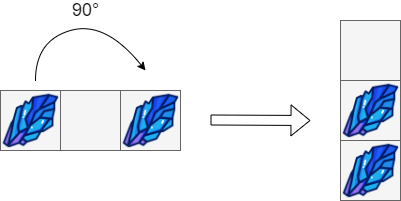
Input: boxGrid = [["#",".","#"]]
Output: [["."],
         ["#"],
         ["#"]]
Example 2:
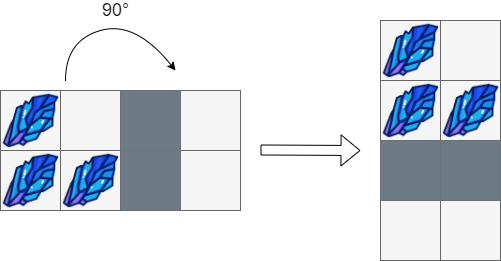
Input: boxGrid = [["#",".","*","."],
              ["#","#","*","."]]
Output: [["#","."],
         ["#","#"],
         ["*","*"],
         [".","."]]
Example 3:
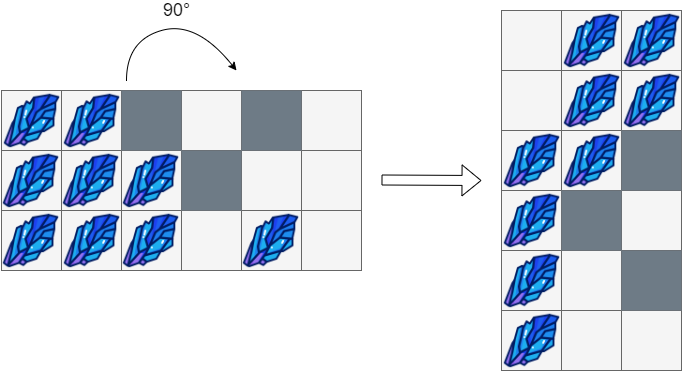
Input: boxGrid = [["#","#","*",".","*","."],
              ["#","#","#","*",".","."],
              ["#","#","#",".","#","."]]
Output: [[".","#","#"],
         [".","#","#"],
         ["#","#","*"],
         ["#","*","."],
         ["#",".","*"],
         ["#",".","."]]
Constraints:
m == boxGrid.lengthn == boxGrid[i].length1 <= m, n <= 500boxGrid[i][j]is either'#','*', or'.'.
Approaches
3 approaches with complexity analysis and trade-offs.
This approach cleverly reorders the operations. We observe that simulating gravity in the final rotated grid is equivalent to simulating gravity horizontally (to the right) in the original grid. By applying this horizontal gravity first, we can modify the input grid boxGrid in-place. After all stones in each row have 'settled' to the right, we then perform the 90-degree clockwise rotation to get the final configuration. This avoids the need for a full intermediate matrix for the initial rotation.
Algorithm
- Realize that a 90-degree clockwise rotation turns the horizontal 'right' direction into the vertical 'down' direction.
- Instead of rotating first, apply gravity horizontally on the original
boxGrid. This means shifting all stones (#) in each row to the rightmost possible positions, respecting obstacles (*). - Iterate through each row
iofboxGrid. - For each row, use a
write_pospointer, initialized to the last column index (n - 1), to track the rightmost available spot for a stone. - Iterate through the row from right to left (
jfromn - 1down to0). - If
box[i][j]is an obstacle'*', it blocks movement. Resetwrite_postoj - 1. - If
box[i][j]is a stone'#, move it tobox[i][write_pos], setbox[i][j]to'.'(ifj != write_pos), and decrementwrite_pos. - After this in-place modification, the
boxGridnow represents the state after horizontal gravity. - Create the final
n x mresult matrix. - Populate the result matrix by rotating the modified
boxGrid:result[j][m - 1 - i] = box[i][j]. - Return the
resultmatrix.
Walkthrough
The core idea is to handle the gravity effect before rotation. For each row in the m x n boxGrid, we make the stones fall to the 'right'. This can be done efficiently in-place. We iterate through each row from right to left. A write_pos pointer keeps track of where the next stone from the left should be placed. When we see a stone, we place it at write_pos and move write_pos one step to the left. When we see an obstacle, it acts as a wall, and write_pos is reset to the position just to the left of the obstacle.
After applying this transformation to all rows of boxGrid, we proceed with the rotation. A new n x m matrix result is created. We then perform the standard 90-degree clockwise rotation, copying elements from the modified boxGrid to the result matrix. This method is more space-efficient because the gravity simulation is done in-place, eliminating the need for an extra n x m matrix used in the first approach.
class Solution { public char[][] rotateTheBox(char[][] box) { int m = box.length; int n = box[0].length; // Step 1: Apply gravity to each row (stones fall to the right) for (int i = 0; i < m; i++) { int writePos = n - 1; for (int j = n - 1; j >= 0; j--) { if (box[i][j] == '*') { writePos = j - 1; } else if (box[i][j] == '#') { box[i][j] = '.'; box[i][writePos] = '#'; writePos--; } } } // Step 2: Rotate the modified box char[][] result = new char[n][m]; for (int i = 0; i < m; i++) { for (int j = 0; j < n; j++) { result[j][m - 1 - i] = box[i][j]; } } return result; }}Complexity
Time
O(m * n). The horizontal gravity pass takes O(m * n), and the final rotation pass also takes O(m * n). The total complexity is O(m * n).
Space
O(1) auxiliary space. The gravity simulation is done in-place. The O(m * n) space for the final `result` matrix is required by the problem output format and is not considered auxiliary.
Trade-offs
Pros
More space-efficient as it modifies the input grid in-place for the gravity simulation, avoiding a large intermediate matrix.
The logic remains fairly intuitive by separating the two main steps.
Cons
While more space-efficient than the first approach, it still requires two separate passes over the data.
In-place modification of the grid can sometimes be trickier to implement correctly than using an auxiliary data structure.
Solutions
Solution
class Solution {public char[][] rotateTheBox(char[][] box) { int m = box.length, n = box[0].length; char[][] ans = new char[n][m]; for (int i = 0; i < m; ++i) { for (int j = 0; j < n; ++j) { ans[j][m - i - 1] = box[i][j]; } } for (int j = 0; j < m; ++j) { Deque<Integer> q = new ArrayDeque<>(); for (int i = n - 1; i >= 0; --i) { if (ans[i][j] == '*') { q.clear(); } else if (ans[i][j] == '.') { q.offer(i); } else if (!q.isEmpty()) { ans[q.pollFirst()][j] = '#'; ans[i][j] = '.'; q.offer(i); } } } return ans; }}Video walkthrough
Newsletter
One sharp idea, every week
System design and interview prep — short enough to finish.
No spam. Unsubscribe anytime.
Practice
Same difficulty — related problems to reinforce the pattern.