
Walking Robot Simulation II
MedPrompt
A width x height grid is on an XY-plane with the bottom-left cell at (0, 0) and the top-right cell at (width - 1, height - 1). The grid is aligned with the four cardinal directions ("North", "East", "South", and "West"). A robot is initially at cell (0, 0) facing direction "East".
The robot can be instructed to move for a specific number of steps. For each step, it does the following.
- Attempts to move forward one cell in the direction it is facing.
- If the cell the robot is moving to is out of bounds, the robot instead turns 90 degrees counterclockwise and retries the step.
After the robot finishes moving the number of steps required, it stops and awaits the next instruction.
Implement the Robot class:
Robot(int width, int height)Initializes thewidth x heightgrid with the robot at(0, 0)facing"East".void step(int num)Instructs the robot to move forwardnumsteps.int[] getPos()Returns the current cell the robot is at, as an array of length 2,[x, y].String getDir()Returns the current direction of the robot,"North","East","South", or"West".
Example 1:
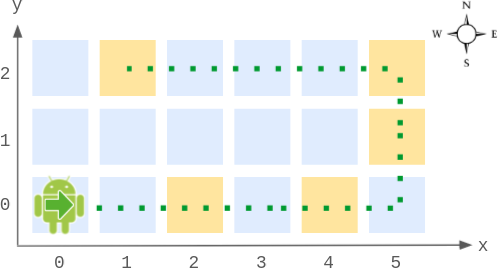
Input
["Robot", "step", "step", "getPos", "getDir", "step", "step", "step", "getPos", "getDir"]
[[6, 3], [2], [2], [], [], [2], [1], [4], [], []]
Output
[null, null, null, [4, 0], "East", null, null, null, [1, 2], "West"]

Explanation
Robot robot = new Robot(6, 3); // Initialize the grid and the robot at (0, 0) facing East.
robot.step(2);  // It moves two steps East to (2, 0), and faces East.
robot.step(2);  // It moves two steps East to (4, 0), and faces East.
robot.getPos(); // return [4, 0]
robot.getDir(); // return "East"
robot.step(2);  // It moves one step East to (5, 0), and faces East.
                // Moving the next step East would be out of bounds, so it turns and faces North.
                // Then, it moves one step North to (5, 1), and faces North.
robot.step(1);  // It moves one step North to (5, 2), and faces North (not West).
robot.step(4);  // Moving the next step North would be out of bounds, so it turns and faces West.
                // Then, it moves four steps West to (1, 2), and faces West.
robot.getPos(); // return [1, 2]
robot.getDir(); // return "West"
Constraints:
2 <= width, height <= 1001 <= num <= 105- At most
104calls in total will be made tostep,getPos, andgetDir.
Approaches
2 approaches with complexity analysis and trade-offs.
This approach directly translates the problem description into code. It simulates the robot's movement one step at a time. For each of the num steps, it calculates the next position. If the move is valid, the robot moves. If the move is out of bounds, the robot turns 90 degrees counter-clockwise and attempts to move again in the new direction, all within the same single step count. This process is repeated for all num steps.
Algorithm
- Initialize the robot's state:
x=0,y=0,dir=0(for East),width, andheight. - Create helper arrays for movement, e.g.,
dx = {1, 0, -1, 0}anddy = {0, 1, 0, -1}for directions East, North, West, South. - Implement the
step(num)method: a. Loopnumtimes, fromi = 0tonum - 1. b. In each iteration, simulate one step. This step might involve turns. c. Use an innerwhile(true)loop to handle the "retry the step" logic. d. Calculate the next potential position(nx, ny). e. If(nx, ny)is within the grid boundaries, update the robot's position(x, y)andbreakthe innerwhileloop. f. If(nx, ny)is out of bounds, update the direction (turn 90 degrees counter-clockwise) and continue the innerwhileloop to retry the step with the new direction. - Implement
getPos()to return the current[x, y]. - Implement
getDir()to return the string corresponding to the current direction.
Walkthrough
The state of the robot is maintained using its coordinates (x, y) and its current direction dir. We can represent the four cardinal directions numerically (e.g., 0 for East, 1 for North, 2 for West, 3 for South). Helper arrays dx and dy can store the change in x and y for each direction.
The step(num) method contains a main loop that iterates num times. Inside this loop, a nested while(true) loop handles a single step. This inner loop is necessary because a single step might require the robot to turn multiple times if it's in a corner before it can make a valid move. For instance, if the robot is at (width-1, height-1) facing North, it will turn West, then South, before it can move one step to (width-1, height-2).
class Robot { int width, height; int x, y, dir; // directions: 0:East, 1:North, 2:West, 3:South int[][] moves = {{1, 0}, {0, 1}, {-1, 0}, {0, -1}}; String[] dirStrings = {"East", "North", "West", "South"}; public Robot(int width, int height) { this.width = width; this.height = height; this.x = 0; this.y = 0; this.dir = 0; // Start facing East } public void step(int num) { for (int i = 0; i < num; i++) { // This inner loop handles one step, which may include turns. while (true) { int nextX = x + moves[dir][0]; int nextY = y + moves[dir][1]; if (nextX >= 0 && nextX < width && nextY >= 0 && nextY < height) { x = nextX; y = nextY; break; // Step successfully completed } else { // Hit a boundary, turn counter-clockwise and retry the step. dir = (dir + 1) % 4; } } } } public int[] getPos() { return new int[]{x, y}; } public String getDir() { return dirStrings[dir]; }}Complexity
Time
O(num) for each call to `step(num)`. Since `num` can be up to 10<sup>5</sup>, this is inefficient.
Space
O(1) - We only store a few variables for the robot's state.
Trade-offs
Pros
It is simple to conceptualize and implement.
It correctly follows the logic described in the problem statement.
Cons
This approach is too slow for large values of
numas its time complexity is directly proportional to the number of steps.It will likely result in a 'Time Limit Exceeded' (TLE) error on platforms with strict time constraints.
This approach significantly optimizes the simulation by understanding the robot's movement pattern. The robot is always confined to the grid's boundary. This boundary forms a closed loop or a cycle. The key insight is that the robot's state (position and direction) is periodic with respect to the number of steps. The length of this perimeter cycle is P = 2 * (width + height - 2). Instead of simulating a large number of steps num, we can use the modulo operator (num % P) to find the equivalent smaller number of steps that result in the same final state. This reduces the number of simulation steps to at most P-1, making the step function's complexity independent of num.
Algorithm
- Observe that the robot always moves along the perimeter of the grid. The total length of this perimeter path is
P = 2 * (width - 1) + 2 * (height - 1). - Any movement of
Psteps from any point on the perimeter cycle brings the robot back to the same position with the same orientation. The only exception is the initial state(0,0)facing East, which is not part of the main cycle. - In
step(num), we can optimize by realizing that only the remainder ofnumdivided byPmatters for the final position. So, we can updatenum = num % P. - A special case arises if
numis a multiple ofP. If the robot is in its initial state(0,0)East, a move ofPsteps will place it at(0,0)but facing South. If it's at any other state, it returns to the same state. We handle this by checking ifnumbecomes 0 after the modulo operation. - After reducing
num, we perform the simulation for the remaining (at mostP-1) steps using the same step-by-step logic as the brute-force approach. SincePis small (<= 792), this is very fast.
Walkthrough
The state of the robot (x, y, dir) is maintained as in the brute-force approach. The step(num) method is where the optimization occurs.
First, we calculate the perimeter P = 2 * (width + height - 2). If the perimeter is greater than 0, we can reduce num by taking num = num % P.
There's a crucial edge case: what if num is a multiple of the perimeter? In this case, num % P becomes 0. If the robot starts at its initial state (0,0) facing East, a move of P steps lands it at (0,0) facing South. For any other state on the perimeter, a move of P steps brings it back to the exact same state (position and direction). We handle this by checking if x=0, y=0, dir=0 when the effective number of steps is 0. If so, we just update the direction to South.
After this initial optimization, the remaining number of steps is at most P-1. We can then simulate these remaining steps using the simple and reliable step-by-step logic from the first approach. Since width and height are at most 100, P is at most 792, so the simulation loop runs a small, constant number of times.
class Robot { int width, height; int x, y, dir; int[][] moves = {{1, 0}, {0, 1}, {-1, 0}, {0, -1}}; String[] dirStrings = {"East", "North", "West", "South"}; public Robot(int width, int height) { this.width = width; this.height = height; this.x = 0; this.y = 0; this.dir = 0; // East } public void step(int num) { int perimeter = 2 * (width + height - 2); if (perimeter > 0) { num %= perimeter; } // If num is 0, we don't move. However, if the original num was a multiple of the perimeter // and we are at the initial state, the direction changes. if (num == 0 && this.x == 0 && this.y == 0 && this.dir == 0) { this.dir = 3; // Becomes South return; } for (int i = 0; i < num; i++) { int nextX = x + moves[dir][0]; int nextY = y + moves[dir][1]; while (nextX < 0 || nextX >= width || nextY < 0 || nextY >= height) { dir = (dir + 1) % 4; nextX = x + moves[dir][0]; nextY = y + moves[dir][1]; } x = nextX; y = nextY; } } public int[] getPos() { return new int[]{x, y}; } public String getDir() { return dirStrings[dir]; }}Complexity
Time
O(width + height) for each call to `step(num)`. The number of iterations is bounded by the perimeter `P`, which is `O(width + height)`. This is effectively constant time as `width` and `height` are small.
Space
O(1) - We only store a few variables for the robot's state.
Trade-offs
Pros
Extremely efficient, with a constant time complexity for the
stepmethod regardless ofnum.Easily passes all time constraints.
Cons
The logic involving modulo arithmetic and handling the special initial state can be tricky to get right.
Requires careful analysis of the robot's movement patterns.
Video walkthrough
Newsletter
One sharp idea, every week
System design and interview prep — short enough to finish.
No spam. Unsubscribe anytime.
Practice
Same difficulty — related problems to reinforce the pattern.