
Rectangle Area
MedPrompt
Given the coordinates of two rectilinear rectangles in a 2D plane, return the total area covered by the two rectangles.
The first rectangle is defined by its bottom-left corner (ax1, ay1) and its top-right corner (ax2, ay2).
The second rectangle is defined by its bottom-left corner (bx1, by1) and its top-right corner (bx2, by2).
Example 1:
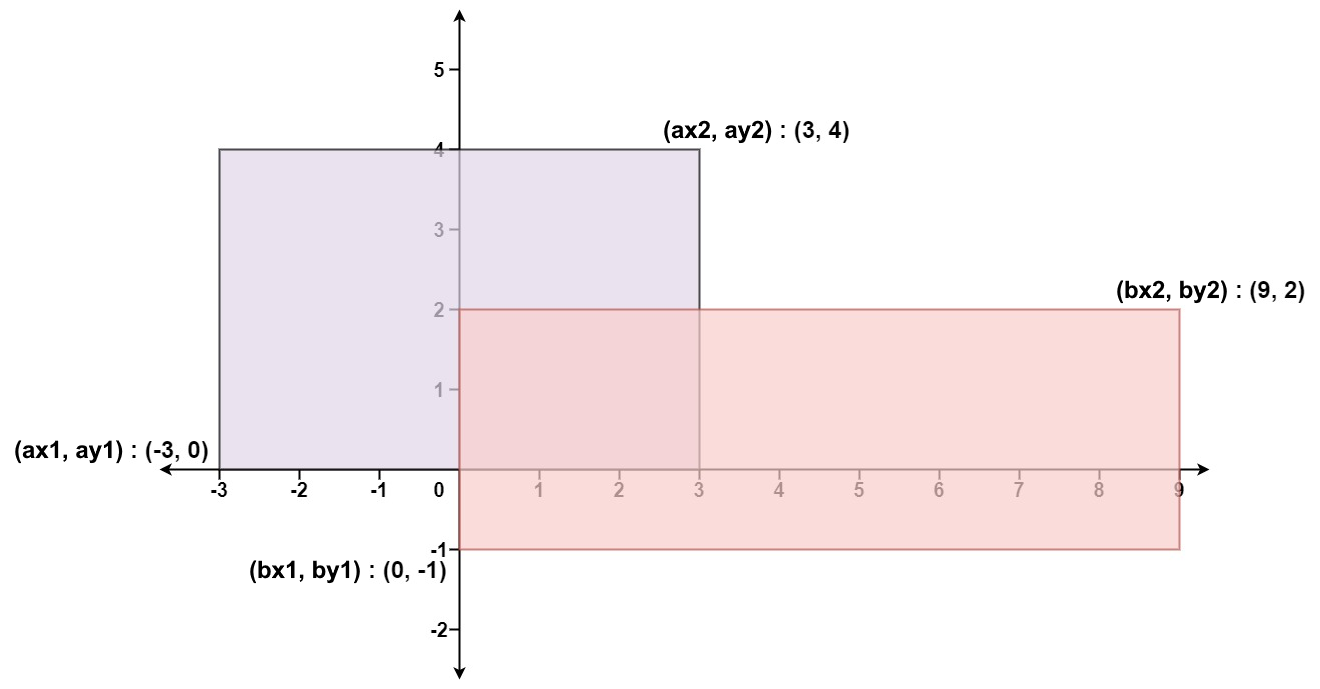
Input: ax1 = -3, ay1 = 0, ax2 = 3, ay2 = 4, bx1 = 0, by1 = -1, bx2 = 9, by2 = 2
Output: 45
Example 2:
Input: ax1 = -2, ay1 = -2, ax2 = 2, ay2 = 2, bx1 = -2, by1 = -2, bx2 = 2, by2 = 2
Output: 16
Constraints:
-104 <= ax1 <= ax2 <= 104-104 <= ay1 <= ay2 <= 104-104 <= bx1 <= bx2 <= 104-104 <= by1 <= by2 <= 104
Approaches
2 approaches with complexity analysis and trade-offs.
Create a grid representation and count all points covered by either rectangle
Algorithm
- Create an empty set to store unique points
- For each point in the first rectangle:
- Add point coordinates to set
- For each point in the second rectangle:
- Add point coordinates to set
- Return size of the set
Walkthrough
In this approach, we create a grid representation of the plane and mark all points that are covered by either rectangle. We then count all marked points to get the total area.
public int computeArea(int ax1, int ay1, int ax2, int ay2, int bx1, int by1, int bx2, int by2) { Set<String> points = new HashSet<>(); // Add points from first rectangle for (int x = ax1; x < ax2; x++) { for (int y = ay1; y < ay2; y++) { points.add(x + "," + y); } } // Add points from second rectangle for (int x = bx1; x < bx2; x++) { for (int y = by1; y < by2; y++) { points.add(x + "," + y); } } return points.size();}This approach is highly inefficient and would only work for small coordinate values. It also doesn't handle floating point coordinates.
Complexity
Time
O((ax2-ax1)*(ay2-ay1) + (bx2-bx1)*(by2-by1)) - Proportional to the areas of both rectangles
Space
O((ax2-ax1)*(ay2-ay1) + (bx2-bx1)*(by2-by1)) - Need to store all points in the set
Trade-offs
Pros
Simple to understand
Handles complex overlapping cases automatically
Cons
Extremely inefficient for large coordinates
Memory intensive
Doesn't work with floating point coordinates
Will fail for the given constraints due to memory limits
Calculate the areas of both rectangles separately and subtract their overlap area
Algorithm
- Calculate area of first rectangle using (ax2-ax1) * (ay2-ay1)
- Calculate area of second rectangle using (bx2-bx1) * (by2-by1)
- Find overlap coordinates:
- left = max(ax1, bx1)
- right = min(ax2, bx2)
- bottom = max(ay1, by1)
- top = min(ay2, by2)
- If overlap exists (left < right && bottom < top):
- Calculate overlap area
- Return sum of areas minus overlap
Walkthrough
This approach uses the mathematical formula for rectangle area (width * height) and calculates the overlap area by finding the intersection points.
public int computeArea(int ax1, int ay1, int ax2, int ay2, int bx1, int by1, int bx2, int by2) { // Calculate areas of both rectangles int area1 = (ax2 - ax1) * (ay2 - ay1); int area2 = (bx2 - bx1) * (by2 - by1); // Find overlap coordinates int left = Math.max(ax1, bx1); int right = Math.min(ax2, bx2); int bottom = Math.max(ay1, by1); int top = Math.min(ay2, by2); // Calculate overlap area int overlap = 0; if (left < right && bottom < top) { overlap = (right - left) * (top - bottom); } // Return total area minus overlap return area1 + area2 - overlap;}This approach directly calculates the areas using width * height formula and handles the overlap by finding the intersection points of the rectangles. If there is no overlap, the overlap area will be 0.
Complexity
Time
O(1) - Only performs simple mathematical calculations
Space
O(1) - Only uses a constant amount of variables
Trade-offs
Pros
Efficient constant time solution
Works with any coordinate values within constraints
No extra space required
Simple mathematical approach
Cons
Need to carefully handle edge cases
Must consider overlap calculation correctly
Solutions
Solution
public class Solution { public int ComputeArea(int ax1, int ay1, int ax2, int ay2, int bx1, int by1, int bx2, int by2) { int a = (ax2 - ax1) * (ay2 - ay1); int b = (bx2 - bx1) * (by2 - by1); int width = Math.Min(ax2, bx2) - Math.Max(ax1, bx1); int height = Math.Min(ay2, by2) - Math.Max(ay1, by1); return a + b - Math.Max(height, 0) * Math.Max(width, 0); }}class Solution { public int computeArea ( int ax1 , int ay1 , int ax2 , int ay2 , int bx1 , int by1 , int bx2 , int by2 ) { int a = ( ax2 - ax1 ) * ( ay2 - ay1 ); int b = ( bx2 - bx1 ) * ( by2 - by1 ); int width = Math . min ( ax2 , bx2 ) - Math . max ( ax1 , bx1 ); int height = Math . min ( ay2 , by2 ) - Math . max ( ay1 , by1 ); return a + b - Math . max ( height , 0 ) * Math . max ( width , 0 ); } }class Solution { public: int computeArea ( int ax1 , int ay1 , int ax2 , int ay2 , int bx1 , int by1 , int bx2 , int by2 ) { int a = ( ax2 - ax1 ) * ( ay2 - ay1 ); int b = ( bx2 - bx1 ) * ( by2 - by1 ); int width = min ( ax2 , bx2 ) - max ( ax1 , bx1 ); int height = min ( ay2 , by2 ) - max ( ay1 , by1 ); return a + b - max ( height , 0 ) * max ( width , 0 ); } };class Solution : def computeArea ( self , ax1 : int , ay1 : int , ax2 : int , ay2 : int , bx1 : int , by1 : int , bx2 : int , by2 : int , ) -> int : a = ( ax2 - ax1 ) * ( ay2 - ay1 ) b = ( bx2 - bx1 ) * ( by2 - by1 ) width = min ( ax2 , bx2 ) - max ( ax1 , bx1 ) height = min ( ay2 , by2 ) - max ( ay1 , by1 ) return a + b - max ( height , 0 ) * max ( width , 0 ) ############ class Solution ( object ): def computeArea ( self , A , B , C , D , E , F , G , H ): """ :type A: int :type B: int :type C: int :type D: int :type E: int :type F: int :type G: int :type H: int :rtype: int """ area = ( C - A ) * ( D - B ) + ( G - E ) * ( H - F ) overlap = max ( min ( C , G ) - max ( A , E ), 0 ) * max ( min ( D , H ) - max ( B , F ), 0 ) return area - overlapVideo walkthrough
Newsletter
One sharp idea, every week
System design and interview prep — short enough to finish.
No spam. Unsubscribe anytime.
Practice
Same difficulty — related problems to reinforce the pattern.