
Rotate Image
MedPrompt
You are given an n x n 2D matrix representing an image, rotate the image by 90 degrees (clockwise).
You have to rotate the image in-place, which means you have to modify the input 2D matrix directly. DO NOT allocate another 2D matrix and do the rotation.
Example 1:
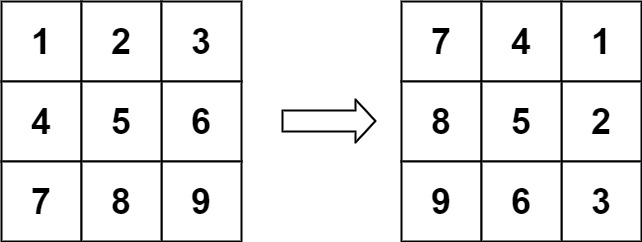
Input: matrix = [[1,2,3],[4,5,6],[7,8,9]]
Output: [[7,4,1],[8,5,2],[9,6,3]]
Example 2:
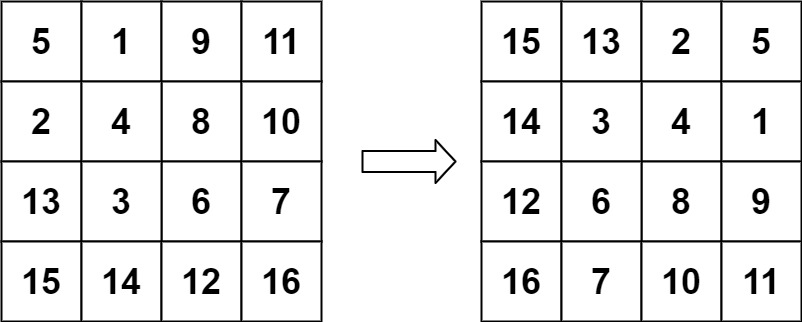
Input: matrix = [[5,1,9,11],[2,4,8,10],[13,3,6,7],[15,14,12,16]]
Output: [[15,13,2,5],[14,3,4,1],[12,6,8,9],[16,7,10,11]]
Constraints:
n == matrix.length == matrix[i].length1 <= n <= 20-1000 <= matrix[i][j] <= 1000
Approaches
3 approaches with complexity analysis and trade-offs.
This is the most straightforward approach but it violates the in-place requirement of the problem. It involves creating a new matrix of the same dimensions to store the rotated image and then copying the result back to the original matrix.
Algorithm
- Get the dimension
nof the matrix. - Create a new
n x ninteger matrix calledrotated. - Iterate through the original
matrixwith row indexifrom0ton-1and column indexjfrom0ton-1. - In each iteration, assign
matrix[i][j]torotated[j][n-1-i]. - After the loops complete, iterate through both matrices and copy the elements from
rotatedback tomatrix.
Walkthrough
The core idea is to map each element matrix[i][j] from the original matrix to its new position [j][n-1-i] in the rotated matrix.
- We first declare a new
n x nmatrix, sayrotated. - We then iterate through the original
matrixusing nested loops. For each elementmatrix[i][j], we calculate its new position and place it in therotatedmatrix:rotated[j][n-1-i] = matrix[i][j]. - After iterating through all elements, the
rotatedmatrix will contain the 90-degree clockwise rotated image. - Finally, we copy the contents of the
rotatedmatrix back into the originalmatrixto satisfy the function signature, although this doesn't make the algorithm in-place.
class Solution { public void rotate(int[][] matrix) { int n = matrix.length; int[][] rotated = new int[n][n]; for (int i = 0; i < n; i++) { for (int j = 0; j < n; j++) { rotated[j][n - 1 - i] = matrix[i][j]; } } // Copy the rotated matrix back to the original matrix for (int i = 0; i < n; i++) { for (int j = 0; j < n; j++) { matrix[i][j] = rotated[i][j]; } } }}Complexity
Time
O(n^2)
Space
O(n^2)
Trade-offs
Pros
Simple to understand and implement.
The logic for mapping coordinates is direct.
Cons
Violates the in-place constraint of the problem, making it an invalid solution for this specific problem statement.
High space complexity.
Solutions
Solution
public class Solution { public void Rotate(int[][] matrix) { int n = matrix.Length; for (int i = 0; i < n >> 1; ++i) { for (int j = 0; j < n; ++j) { int t = matrix[i][j]; matrix[i][j] = matrix[n - i - 1][j]; matrix[n - i - 1][j] = t; } } for (int i = 0; i < n; ++i) { for (int j = 0; j < i; ++j) { int t = matrix[i][j]; matrix[i][j] = matrix[j][i]; matrix[j][i] = t; } } }}Video walkthrough
Newsletter
One sharp idea, every week
System design and interview prep — short enough to finish.
No spam. Unsubscribe anytime.
Practice
Same difficulty — related problems to reinforce the pattern.